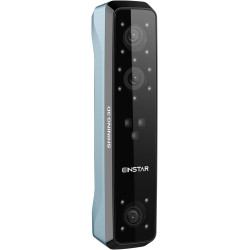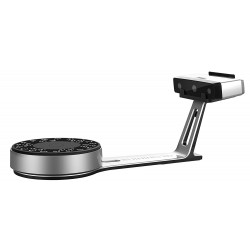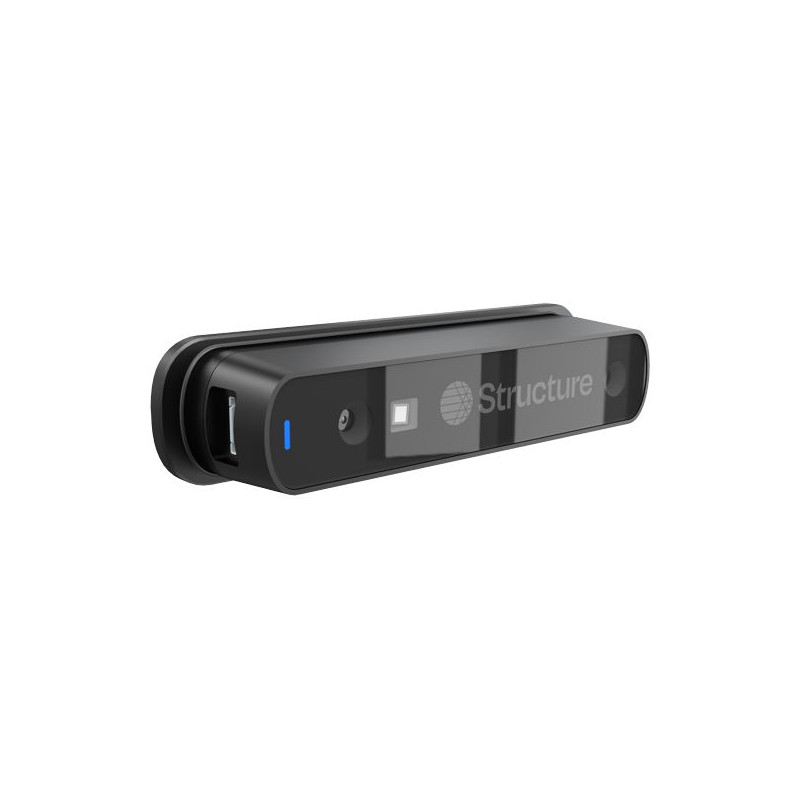
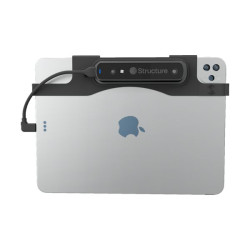
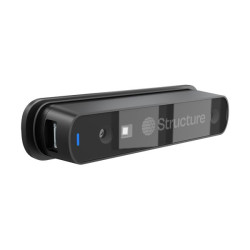
The Structure Sensor 3 is a professional, mobile 3D scanner for the iPad, designed for rapid scanning of people, body parts, and objects. It is particularly well-suited for applications in medicine, orthotics, prosthetics, rehabilitation, biomechanics, and the design of user-specific products. Combining the sensor with a compatible iPad creates a portable 3D scanning station. The resulting models can be used for further design, documentation, and data preparation for CAD systems and 3D printing.
Structure Sensor 3 – Professional Mobile 3D Scanning System
The Structure Sensor 3 is a professional, mobile 3D scanner for the iPad, designed for rapid scanning of people, body parts, and objects. It is particularly well-suited for applications in medicine, orthotics, prosthetics, rehabilitation, biomechanics, and the design of user-specific products.
Combining the sensor with a compatible iPad creates a portable 3D scanning station. The resulting models can be used for further design, documentation, and data preparation for CAD systems and 3D printing.
Structure is developing the Sensor 3 as a professional solution intended primarily for medicine, orthotics, prosthetics, rehabilitation, biomechanics, research laboratories, technical education, and companies creating customized products. The system can also be used in industry, design, asset digitization, military and training applications, and the creation of models for VR and AR environments.
Connecting the sensor to an iPad provides mobility and the ability to conduct the entire scanning process without a complex computer workstation. The operator can continuously monitor the quality of the acquired data, correct the scanning method and immediately evaluate the finished model.
Key features of the solution:
Professional real-time depth scanning,
Two infrared cameras with global shutter,
Active infrared projector with a 940 nm wavelength,
Dedicated body and object scanning modes,
Maximum capture rate of up to 30 frames per second in the main modes,
Mobile operation using a compatible iPad,
Ability to create models with geometry and texture,
Data export to OBJ, PLY, and STL formats,
Sensor integration with custom software via Structure SDK,
Applicable in professional measurement, design, medical, and research processes.
Technical Specifications
https://support.structure.io
Design
Weight according to detailed technical documentation: 130 g
Height: 29.48 mm
Width: 29.07 mm
Length: 107.31 to 119.46 mm, depending on configuration
Front cover: borosilicate glass
Rear cover and housing components: anodized aluminum
Operating temperature: 0–35°C
Storage temperature: 0–50°C
Declared IP65 compliance, but no formal IP65 certification
Manufacturer-declared resistance: Performance other than accuracy maintained after 1-meter drop tests in the packaging.
Depth measurement system
Technology: active infrared scanning
IR projector: infrared laser
Wavelength: 940 nm
Laser safety class: declared Class 1
Number of IR cameras: 2
Shutter: global, meaning the entire frame is recorded simultaneously
Field of view:
horizontal: approximately 51.8°
vertical: approximately 59.9°
diagonal: approximately 74.3°
Minimum distance according to the technical documentation: 20 cm
Maximum distance according to the technical documentation: 5 m.
Resolution and Frame Rate
The documentation specifies, among other things:
IR image up to 1080 × 1280 pixels
10-bit RAW recording at a lower frame rate
8-bit RAW recording up to 30 FPS, i.e., 30 frames per second
Body mode: 752 × 940 at 30 FPS
Body Detailed mode: 1040 × 1200 at 15 FPS
Close mode: 752 × 940 at 30 FPS
Medium Range and Long Range modes: 752 × 940 at 30 FPS
Ultra Close mode: 520 × 600 at 50 FPS, although the documentation indicated it was unavailable at launch.
Power
Battery: lithium-ion
Energy capacity: 6.5 Wh
Maximum declared operating time: approximately 3 hours
Charging from a wall charger exceeding 7.5 W: approximately 2 hours
Charging from an active USB port or hub: approximately 2.5 hours
Charging from a standard computer USB data port: approximately 5.5 hours
Software Required for Operation
1. Structure App
Official service and diagnostic app. Used for:
updating the sensor firmware,
checking the device and battery status,
viewing the depth beam,
viewing the IR image,
viewing the combined depth and color image,
sending diagnostic data to the manufacturer.
Firmware refers to the internal software of the device that controls its electronics and how it communicates with the app.
support.structure.io
2. Structure Sensor Calibrator
A calibration app that matches the depth image from the sensor to the image from the iPad camera. It is primarily needed when the scan requires properly applied color or texture.
The calibration result is saved in the sensor and can be used by other Structure apps.
3. Structure Capture
The main app for scanning:
people,
body parts,
objects,
small areas.
Supports model export in the following formats:
OBJ – a mesh model that can include textures,
PLY – a point cloud or mesh format,
STL – a geometry format often used in 3D printing and CAD systems.
The application is primarily presented as a professional solution for healthcare, orthotics, prosthetics, medical apparel, and product design.
https://apps.apple.com/pl/app/structure-capture-3d-scanning/id6450060157
4. Scanner – Structure SDK
A simpler demo application that allows you to scan objects and people. It also serves as an example for developers demonstrating basic use of the SDK.
support.structure.io/article/464-which-apps-currently-support-structure-sensor-3
5. Third-Party Applications
Structure Sensor 3 can work with applications built with Structure SDK 3.1 or later. However, this does not guarantee automatic compatibility with older applications that support previous generations of the sensor.
6. Structure SDK
The SDK is a set of libraries and tools that allow you to create your own applications using the sensor. support.structure.io/article/417-structure-sdk-ios-release-notes
Significant limitations:
Some features are available commercially.
Commercial applications may require license keys.
Some features require an active Structure Commercial SDK license.
According to the manufacturer, a license key can only work offline for approximately 7 days.
The cross-platform SDK version has been marked as paused, but iOS/iPadOS remains the primary active environment.
Hardware Requirements
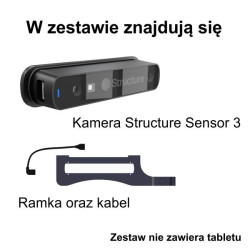
For full operation, you need:
Structure Sensor 3,
a compatible iPad,
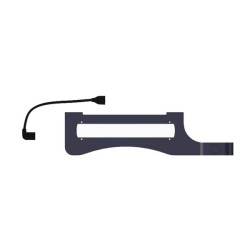
a mount specific to your iPad model,
a suitable USB-C or Lightning cable,
installed apps,
access to a charger,
sufficient memory and space for 3D models.
Recommended iPads
The manufacturer primarily recommends iPad Pro models, including:
iPad Pro 11″ and 13″ with M4 and M5 processors,
iPad Pro 11″ and 12.9″ with M1 and M2 processors,
selected older iPad Pro models with A12Z. Other compatible models
The list also includes:
iPad 10th and 11th generation,
iPad 9th generation with Lightning,
iPad Air 5th generation,
iPad Air 11″ and 13″ with M2 or M3,
iPad mini 6th and 7th generation.
The manufacturer warns that older iPads may still work, but they are no longer being tested or optimized. For Lightning devices, the 9th generation iPad is the most officially confirmed model.
Advantages
Mobility
The iPad-based sensor creates a compact workstation that can be easily moved between rooms, offices, or locations. It eliminates the need for a typical workstation with a stationary scanner, computer, and numerous cables.
Real-time Operation
The operator can monitor the scan directly on the iPad screen and immediately assess whether a given area of the object has been correctly captured.
Good Profile for Body Scanning
The manufacturer is developing pre-built Body and Body Detailed modes, targeting the device primarily for medical, prosthetic, and anatomical applications.
Global Shutter
The global shutter reduces geometric distortions that occur when the sensor or object moves. This is advantageous compared to cameras using a rolling shutter, which read the image line by line.
Independent Active Depth Source
The sensor does not rely solely on visible light. The infrared projector allows for measuring the geometry of poorly textured surfaces, although there are still challenges with transparent, reflective materials, and strong sunlight.
Standard export formats
OBJ, PLY, and STL allow you to transfer results to numerous CAD applications, 3D printing, modeling, visualization, and analysis tools.
Create your own applications
The Structure SDK allows you to integrate scanning into your own business process, medical application, measurement system, or training solution.
Key Practical Limitations
Sunlight
The sensor can operate in indirect sunlight, but the manufacturer does not recommend operation in direct sunlight. Strong infrared radiation disrupts the pattern emitted by the IR projector.
Therefore, this solution is much better suited for rooms, halls, laboratories, and shaded workspaces than for open spaces on a sunny day.
Problematic Surfaces
Active IR technology may have difficulty with:
glass,
mirrors,
shiny metal,
chrome surfaces,
transparent materials,
very dark or strongly infrared-absorbing surfaces,
thin edges, and wires.
Such surfaces may require matting, marking, changing the scanning angle, or using a different technology.
Object Movement
A global shutter aids in movement but does not eliminate the problem of geometry changes during a full scan. A human should maintain the most stable position possible, and moving objects can lead to distortions or duplicate surfaces.
This is not an industrial-grade metrology device.
The Structure Sensor 3 can be very useful for:
shape mapping,
orientation measurements,
product fit,
documentation,
visualization,
creating models for printing.
However, without additional validation, it should not be considered a replacement for:
a coordinate measuring machine (CMM),
an industrial scanner with certified accuracy,
a surveying laser scanner,
a dental scanner,
a photogrammetric system for large objects,
a medically approved diagnostic device.
The manufacturer itself notes that the declared accuracy may not be sufficient for some automotive applications.
Limited Scan Size
Although the documentation states a maximum range of 5 m, the sensor is most useful for scanning people, body parts, objects, and small spaces. For buildings, terrain, large vehicles, or detailed inventory of warehouses, a longer-range LiDAR scanner or photogrammetry may be more appropriate.
Typical Applications
Full-body scanning,
Foot, limb, torso, and head scanning,
Orthoses and prosthetics design,
Creating models for compression garments,
Designing custom equipment,
Ergonomics and anthropometry,
Monitoring body shape changes,
Documenting rehabilitation progress,
Creating models for 3D printing,
Digitizing objects,
Museum and educational documentation,
Creating resources for augmented and virtual reality,
Product design,
Human-computer interaction research,
Creating custom measurement applications.
Who is this product for?
The Structure Sensor 3 is particularly suitable for:
prostheticians and orthotists,
physiotherapists,
rehabilitation clinics and offices,
biomechanics specialists,
anthropometric laboratories,
manufacturers of custom-fit equipment,
medical and sports companies,
technical and medical universities,
research and development teams,
product designers,
developers of applications using depth data,
3D printing studios,
museums and documentation centers.
It will be less suitable for users who expect automatic, highly accurate scanning of any object without calibration, processing, or understanding the limitations of the technology.
FAQ – Frequently Asked Questions about Structure Sensor 3
Does Structure Sensor 3 work with the iPad Pro M5?
Yes. The manufacturer lists the 11-inch iPad Pro M5 and the 13-inch iPad Pro M5 (2025) as recommended devices for Structure Sensor 3. Each model requires a suitable mount and cable.
Which iPad is the best choice for Structure Sensor 3?
The manufacturer primarily recommends compatible iPad Pro models. However, select iPad, iPad Air, and iPad mini models are also supported. Before purchasing, please verify the exact iPad model number and select the appropriate mount.
Does Structure Sensor 3 work with iPhone?
A compatible iPad is required when using the external Structure Sensor 3 with the Structure Capture app. iPhone users can use Structure Capture with the built-in Apple TrueDepth or LiDAR sensors, but not with the Structure Sensor 3 connected.
What file formats does Structure Sensor 3 support?
Structure Capture allows you to export models in STL, OBJ, and PLY formats, among others. This allows scans to be transferred to numerous CAD programs, 3D modeling systems, and for preparing models for 3D printing.
Is Structure Sensor 3 suitable for orthotics and prosthetics?
Yes. Orthotics and prosthetics are among the manufacturer's recommended applications. Mobile scanning of body parts can be used as part of the digital design process for individually tailored solutions.
Is Structure Sensor 3 suitable for full-body scanning?
The sensor has modes designed for body scanning and can be used to acquire the geometry of individuals and individual body parts. The quality of the result depends on factors such as lighting conditions, the movement of the person being scanned, and the way the sensor is guided.
Can Structure Sensor 3 be used for 3D printing?
Yes. The manufacturer plans to use Structure Sensor 3 to create models, which can then be exported and further processed before 3D printing.
Can you create your own applications for Structure Sensor 3?
Yes. The Structure Sensor 3 is compatible with Structure SDK 3.1 or later. The SDK allows developers to create their own apps that leverage sensor data.
What do you need to use the Structure Sensor 3?
A typical setup includes the Structure Sensor 3, a compatible iPad, a mount designed for the specific iPad model, the appropriate cable, and the appropriate software.
Does the Structure Sensor 3 work in direct sunlight?
The manufacturer does not recommend direct sunlight. The active infrared system works best indoors or in environments free from strong, direct sunlight.
Product Safety (GPSR)
PRODUCT IDENTIFICATION
Structure Sensor 3
Model: ST03
Part number: 30036P7
Manufacturer
XRPro, LLC (Structure)
1600 Range Street, Suite 101, Boulder, CO 80301, USA
structure.io
E-mail: support@structure.io
Responsible entity in the EU
Pronet Kraków Sp. z o.o.
ul. Wallek-Walewskiego 9, PL 30-094 Kraków
pronetkrakow.com.pl
Warnings and safety information
Safe use:
The device is intended for 3D scanning using a compatible mobile device and software.
The device uses a Class 1 laser in accordance with IEC 60825-1:2014.
Permissible operating temperature is 0°C to 35°C; storage temperature is 0°C to 50°C.
Use the screws provided by the manufacturer to mount the sensor.
Check that the connector is free of debris or obstructions before connecting the cable.
Avoid applying pressure to the connected cable and do not bend it at a sharp angle.
It is recommended to disconnect the cable before transporting the device.
If a red error indicator appears, check its meaning in the manufacturer's documentation and follow the recommended actions. Product documentation:
User manual:
https://structure.io/structure-sensor-3/getstarted
Declaration of conformity:
https://structure.io/content/resellers/resources/compliance/doc.pdf
Manufacturer support:
https://support.structure.io/collection/450-structure-sensor-3
The Structure Sensor 3 is a professional, mobile 3D scanner for the iPad, designed for rapid scanning of people, body parts, and objects. It is particularly well-suited for applications in medicine, orthotics, prosthetics, rehabilitation, biomechanics, and the design of user-specific products. Combining the sensor with a compatible iPad creates a portable 3D scanning station. The resulting models can be used for further design, documentation, and data preparation for CAD systems and 3D printing.