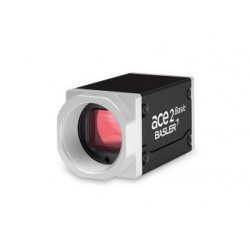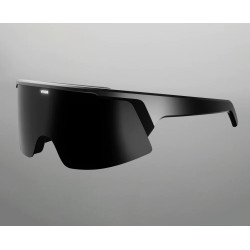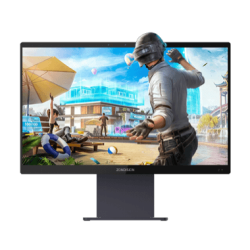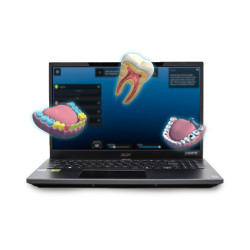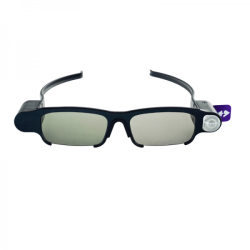


ILLUMETRY IO is a desktop XR display that allows you to view, rotate, and analyze interactive 3D models as if they were directly in front of you. The system utilizes a 24-inch screen operating at 120 Hz, active stereoscopic glasses with position tracking, and a precise 6DoF stylus.
The IO model is primarily suited for applications requiring precise analysis of a single object: a mechanical part, an anatomical model, a microscopic dataset, a CAD design, or an interactive training scenario.
ILLUMETRY IO is a desktop XR display that allows you to view, rotate, and analyze interactive 3D models as if they were directly in front of you. The system utilizes a 24-inch screen operating at 120 Hz, active stereoscopic glasses with position tracking, and a precise 6DoF stylus.
The IO model is primarily suited for applications requiring precise analysis of a single object: a mechanical part, an anatomical model, a microscopic dataset, a CAD design, or an interactive training scenario.
Who is this product for?
ILLUMETRY IO is a solution for:
schools, technical universities, and training centers,
medical programs, laboratories, and research institutions,
design teams using CAD models,
Unity and Unreal Engine application developers,
R&D and product engineering departments,
technical and procedural training centers,
museums, science centers, and interactive exhibits,
military and air force units seeking a visualization or training station—provided a dedicated application is available.
The manufacturer primarily targets K-12 education, meaning education from preschool to high school, STEM education, and medical and scientific applications. STEM stands for science, technology, engineering, and mathematics.
Important Information Before Purchasing
1. Device Requires Glasses
The full spatial effect is visible through active shutter glasses. This is not an autostereoscopic display that works without glasses. The glasses are tracked by a system that adjusts the image perspective to the user's position.
2. The hardware itself does not provide ready-made applications
To display content, you need compatible software, a ready-made industry package, or an application developed specifically for Illumetry. A standard CAD file, 3D model, or medical data should not be considered automatically ready for a full, interactive presentation without verifying the format and the application being used.
The manufacturer offers, among other things, a CAD model viewer, a STEM library, and integrations with educational and medical applications.
3. A Computer Required
The IO is a display that works with a computer, and the level of detail and smoothness of the models depend on the performance of the workstation and the application. The manufacturer does not currently publish a complete, up-to-date table of minimum requirements for the processor, graphics card, RAM, and operating system. The computer configuration should be determined based on the application being used and the complexity of the models.
4. Verify the number of simultaneous users
Public documentation describes tracking the position of a user wearing glasses, but it does not clearly specify the number of people who can simultaneously receive independent, accurate stereoscopic perspective. Before purchasing for a classroom or training room, confirm the number of glasses supported and the number of viewpoints tracked.
Advantages
Very natural depth perception without wearing a closed VR headset.
Maintaining eye contact with the instructor and others.
Precise stylus for manipulating objects in space.
Integration with Unity and declared compatibility with Unreal Engine.
Ability to create custom controllers and industry-specific tools.
Lightweight display only – 3.9 kg.
A good solution for a single teaching, research, or demonstration station.
Ability to work with CAD models, anatomy, microscopic data, and volumetric visualizations.
Disadvantages and Limitations
Requires the use of special glasses.
The screen resolution is 1920 x 1080, which may be a limitation with very small text, interfaces, and exceptionally detailed data.
The value of the solution is directly dependent on the quality of the available software and 3D content.
Implementing custom applications may require the work of a Unity developer or XR integrator. The manufacturer does not publish a clear, up-to-date matrix of supported operating systems and current engine versions.
The goggles are an active component with a battery, requiring charging and equipment management.
This is not a certified medical, aviation, or military simulator simply because it displays 3D models. Certification for a specific scenario depends on the software used, data, and user procedures.
Application and Sectoral Suitability
Education and Higher Education – Very High
The IO is suitable for presenting anatomy, biology, physics, chemistry, mechanics, astronomy, and engineering topics. The manufacturer offers or recommends the Varwin Education, VISR, Shapelab, STEM library, Pixel Art, and CAD viewer applications.
Medicine and Laboratories – High
The system can present data from computed tomography, magnetic resonance imaging, microscopy, and 3D segmentation. Among the available integrations, the manufacturer lists SyGlass, OHdoctor, and VOKA. However, it is important to distinguish between data visualization and diagnostics: public materials do not indicate that the Illumetry IO itself is a certified medical device for clinical decision-making.
Industry, Engineering, and R&D – High
Useful for reviewing CAD models, digital prototyping, presenting device designs, service planning, and operator training. It is most valuable for models whose spatial structure is difficult to explain on a traditional monitor.
Military and Services – Moderate to High, depending on the application
Potential applications include training in equipment construction, maintenance procedures, terrain model analysis, medical training, and equipment demonstrations. However, the manufacturer does not publicly provide confirmed military implementation or information on environmental resilience, handling classified information, or compliance with defense standards. Therefore, the IO should be considered a training and visualization station, not a finished military system.
Aviation – Moderate to High, depending on the content
It can be used to train aircraft assembly, maintenance procedures, system layout, or present engineering data. There is no public information regarding its qualification as a certified flight simulator.
Museums and Science Centers – High
The IO allows for the presentation of historical objects, artifacts, reconstructions, and physically inaccessible models, while maintaining the user's connection to the exhibit and its surroundings.
Software
Ready-made packages and integrations
The manufacturer recommends, among others:
Varwin Education – creating interactive scenes and visual programming,
VISR Stage – creating your own worlds and experiences,
Shapelab – sculpting and modeling in 3D,
CAD Model Viewer – viewing CAD models,
Illumetry STEM Library – educational models,
SyGlass – visualization of microscopic datasets and volumetric data,
OHdoctor – an anatomy library based on tomography data,
VOKA – anatomy and pathology models.
Creating your own applications
The Illumetry SDK, a set of development tools, and Antilatency components are available. Unity's public documentation still lists Unity versions 2020.3.45f1 to 2022.2.0a17 as tested, with 2021.3.5f1 being the recommended version. These are relatively old releases, so before starting a new project, you must confirm support for the current version of Unity.
The developer also claims integration with Unreal Engine, but the public documentation available on the website is much more detailed for Unity.
ILLUMETRY IO Specifications
Display
Parameter: Value
Diagonal: 24″ / 609.7 mm
Resolution: 1920 × 1080
Refresh Rate: 120 Hz
Typical Contrast: 1000:1
Number of Colors: 16.7 million
Horizontal Viewing Angle: 75–85°
Vertical Viewing Angle: 70–80°
Infrared LEDs: 16
IR Wavelength: 850 nm
Dimensions: 20.3 × 568 × 435.2 mm
Weight: 3.9 kg
Glasses
Parameter: Value
Technology: Active Shutter Glasses
Lens Type: LCD, TN
Sync: RF 2402–2480 MHz / USB
Battery: 700 mAh
Lens Diagonal: 59 mm
Dimensions: 170 × 40 × 165 mm
Weight: 99 g
Stylus
Parameter: Value
Tracking: 6DoF, Anti-latency Alt tracker
Connection: USB
Cable Length: 1.5 m
Dimensions: 18 × 18 × 140 mm
Weight: 105 g
ILLUMETRY EOS
ILLUMETRY EOS is a 65-inch XR table designed for the impressive presentation of large and complex 3D models. The system tracks the user's glasses using four cameras and adjusts the image perspective based on their position. The user can view the model from various angles, change the scale, switch views, and control the presentation using a tablet or an optional gesture module.
EOS is a solution for salesrooms, showrooms, demonstration centers, museums, design offices, and exhibition spaces. Unlike IO, it focuses more on collaborative design presentation than on individual, precise engineering work.
Who is this product for?
Developers and real estate companies,
architectural studios,
infrastructure and construction companies,
urban planning entities,
mining and geological companies,
museums and cultural heritage institutions,
demonstration and exhibition centers,
manufacturers presenting large installations or digital twins,
military and aviation institutions requiring extensive spatial visualization – after developing the appropriate software and meeting security requirements.
The manufacturer demonstrates EOS applications in real estate, infrastructure visualization, mining, photogrammetry, and the presentation of a digital model of the historic center of Nicosia.
Important Information Before Purchasing
1. This is a large and heavy device.
The EOS measures 1650 x 1025 x 560 mm and weighs 91.5 kg. The manufacturer provides a shipping box and claims installation takes approximately 15 minutes, but it is not a device that can be easily moved between rooms by a single person.
2. The 3D effect also requires glasses.
The 3D image is created for a user wearing active glasses with infrared markers. Those without glasses can view the traditional image on the screen surface or on an optional external monitor, but they will not receive the same stereoscopic effect.
3. Content must be ordered or prepared.
EOS does not automatically convert any BIM, CAD, aerial photo, or terrain model project into a finished presentation. The model must be prepared, optimized, and interactive. The manufacturer offers its own content creation studio and the ability to integrate with CRM systems and other data sources. CRM stands for Customer Relationship Management System.
4. Licenses and scope of the kit require confirmation.
The public website lists the table, glasses, and shipping boxes, but does not provide the number of glasses, the full computer configuration, SDK license terms, update costs, or the scope of service support. This information should be included in the sales offer.
Advantages
Very large presentation area.
Ability to show an entire city, investment, area, or plant in a single scene.
Works in standardly lit rooms – no need to darken the room.
Control via tablet or optional gestures.
Option to connect an additional display.
Integration with current business data, such as prices and investment status.
Ability to store multiple projects on a single device.
Strong presentation impact during trade shows, management meetings, and client presentations.
Disadvantages and limitations
Weight of 91.5 kg and large dimensions.
Requires the use of glasses.
High probability of additional costs related to content preparation and integration. The 3D resolution is 1920 x 1080 despite the use of a panel described as 4K.
No public computer or graphics station specifications.
No clearly stated number of concurrently tracked users.
This is not a field or industrially rugged device; public documentation does not specify IP rating, vibration resistance, temperature range, or compliance with military or aerospace standards.
Sectoral Applications and Suitability
Real estate, architecture, and urban planning – very high
This is the main area of EOS positioning. The system allows for the presentation of entire housing estates, buildings, floor plans, interiors, animations, and information on prices and availability of units.
Infrastructure and Construction – Very High
It can present models of roads, railways, airports, ports, industrial plants, and urban developments. The manufacturer demonstrates the use of photogrammetry and drone mapping data.
Mining and Geology – High
EOS can visualize terrain, geological layers, drilling routes, and spatial data. The manufacturer presents such applications directly on the product page.
Industry – High for presentations, Moderate for construction work
It is well-suited for presenting a factory, production line, large product, or digital twin. For detailed design work on a single element, an IO or a traditional CAD station may be more practical.
Military and Security – Potentially High, but requires integration
Potential applications include visualizing terrain, infrastructure, facility layout, logistics scenarios, and reconnaissance data. However, I haven't found any public confirmation of military deployments, security certification, or a mode of operation designed for classified data. Before such deployment, offline capability, data storage method, service access, and the origin of all components must be confirmed.
Aviation and Airports – High for Infrastructure Presentations
EOS can present airport layouts, terminal plans, taxiways, technical infrastructure, or expansion scenarios. However, it is not a certified flight simulator or air traffic control system.
Museums and Cultural Heritage – High
The manufacturer used EOS to visualize a digital model of the historic center of Nicosia. The system can present reconstructions of buildings, archaeological sites, and large exhibits in the form of interactive models.
Education and Laboratories – Moderate
EOS can be useful for lectures and large presentations, but IO is more suitable for individual model manipulation, laboratory work, and station-based learning.
Software
EOS can use:
dedicated presentations prepared by the Illumetry studio,
Unity-based applications,
integration via the Illumetry SDK and API,
tablet control application,
gesture support module,
connections to CRM and other databases,
models prepared from CAD, BIM, GIS, photogrammetry, or drone mapping data – after appropriate processing.
API is an interface enabling the exchange of data between applications. BIM stands for building information modeling, while GIS stands for geographic information system. The manufacturer declares support for popular 3D engines, including Unity, and the ability to integrate other solutions via SDK and API.
ILLUMETRY EOS Specifications
Table and Display
Parameter: Value
Diagonal: 65″ / 1645 mm
Display Type: 4K OLED
3D Resolution: 1920 × 1080
3D Frame Rate: 120 Hz
Tracking Technology: Optical, 4 Cameras
Sampling Rate: Manufacturer states "<900 Hz"
Tracking Response Time: Less than 2 ms
Tracking Error Margin: Less than 2 mm
Connectivity: Ethernet / Wi-Fi
Dimensions: 1650 × 1025 × 560 mm
Weight: 91.5 kg
Glasses
Parameter: Value
Technology: Active Shutter Glasses
Lens Type: LCD, TN
Tracking Markers: Active Infrared Markers Rechargeable
Infrared synchronization
Lens diagonal: 58 mm
Dimensions: 170 × 40 × 165 mm
Weight: 78 g
ILLUMETRY IO is a desktop XR display that allows you to view, rotate, and analyze interactive 3D models as if they were directly in front of you. The system utilizes a 24-inch screen operating at 120 Hz, active stereoscopic glasses with position tracking, and a precise 6DoF stylus.
The IO model is primarily suited for applications requiring precise analysis of a single object: a mechanical part, an anatomical model, a microscopic dataset, a CAD design, or an interactive training scenario.