The Rokoko Smartsuit Pro II is a wireless full-body motion capture suit—or mocap. The system uses a set of IMU (Inertial Measurement Unit) sensors distributed across the wearer's body.
Rokoko Smartsuit Pro II – Wireless Motion Capture Suit
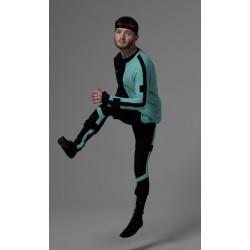
The Rokoko Smartsuit Pro II is a wireless full-body motion capture suit—or mocap. The system uses a set of IMU (Inertial Measurement Unit) sensors distributed across the wearer's body.
The suit records the position and movement of individual body parts and then transmits the data via Wi-Fi to Rokoko Studio. Motion can be recorded, enhanced, exported to animation files, or transmitted in real time to tools such as Unreal Engine, Unity, Blender, Maya, Houdini, Cinema 4D, MotionBuilder, or iClone.
The Smartsuit Pro II does not require external cameras or a permanent studio space. It can operate indoors, outdoors, and in locations where installing a traditional optical system would be difficult or expensive.
Key Features:
Wireless full-body motion capture,
No need for tracking cameras or optical markers,
Wi-Fi data transmission,
Indoor and outdoor operation,
Real-time avatar movement preview,
Multi-shot recording in Rokoko Studio,
Data export to FBX, BVH, and—depending on the plan—CSV formats,
Integration with the most popular game engines and 3D programs,
Option to expand the set with Smartgloves for finger tracking and the Face Capture system for facial expression recording,
Textile suit made of nylon and elastane,
Electronics can be removed and the textile part can be washed,
Available with interchangeable textile parts for different users,
One-year manufacturer's warranty.
Technical Specifications
System Type:
Technology: Inertial Motion Capture
Tracking Method: IMU Sensors Placed Directly on the Body
Transmission: Wi-Fi
USB Connection: Used Primarily for Configuration and Firmware Updates
Internet: Required for logging in to Rokoko Studio, among other things; offline capability depends on the selected plan
Ability to Work with the Suit's Internal Hotspot
Motion data is not normally transmitted to a computer via USB. During actual motion capture, the suit communicates with Rokoko Studio via Wi-Fi.
Number of Sensors
Standard Version: 19 Wired IMU Sensors
Glove Ready Version: 17 Sensors, as the hand sensors have been replaced with connectors for connecting Smartgloves.
The built-in sensors in the standard version track the position of the hands and wrists but do not record individual finger movements. Full finger capture requires separate Smartgloves.
Recording Rate
Standard mode: Designed for typical character movements,
Boost mode: Up to 200 frames per second,
Accelerometer range in Boost mode: Up to 16 g.
The 200 FPS mode is designed for fast movements, dynamic scenes, falls, jumps, and movements with higher acceleration, among other things.
Connectivity
Supported Wi-Fi networks: 2.4 GHz and 5 GHz,
Recommended connection: Dedicated 5 GHz router,
Supported addressing protocol: IPv4,
No direct IPv6 support,
No native support for networks operating exclusively in Wi-Fi 6/AX mode,
A Wi-Fi 6 router may work if set to compatibility mode, e.g., b/n/ac/ax.
The manufacturer recommends against using some Wi-Fi 7 routers and some devices provided by internet service providers.
The built-in hotspot allows for operation without a traditional router, but only supports one suit at a time and is not compatible with Smartgloves in this mode.
Power Supply
The suit does not come with a power bank as standard. The user must purchase an appropriate power source.
Recommended parameters:
Standard USB power bank,
USB-A output,
Voltage: 5 V,
Current: 3 A,
Suggested capacity: at least approximately 10,000 mAh,
Approximate operating time: approximately one hour for every 1000 mAh of power bank capacity.
Using a power source higher than 5 V may damage the electronics.
Material and Care
Textile material: nylon and elastane,
Flexible construction that adapts to the body,
Electronics can be removed,
The fabric can be washed after the electronics are removed,
Recommended storage: on a hanger, in a cool, dry place,
Avoid long-term storage when folded or near metal surfaces.
Available sizes
Size range: S–XL,
No custom sizes available,
No version designed for children under 155 cm tall,
No version for animals or objects moving on all fours,
It is possible to purchase an additional fabric suit and transfer the same electronics set into it.
Software Required for Operation
Rokoko Studio
Smartsuit Pro II requires Rokoko Studio software to run. The suit cannot be used as a standalone source of ready-made motion data without this software.
Rokoko Studio is responsible for:
suit configuration,
firmware updates,
creating actor profiles,
calibration,
movement visualization on the avatar,
session recording,
processing raw sensor data,
operating inverse kinematics models,
data filtering,
foot slip limitation,
knee movement smoothing,
correcting the height and position of the focal point of the character,
retargeting (transferring motion to another model or skeleton),
animation export,
data transmission to other programs.
Supported Operating Systems
Windows – Minimum:
Windows 10 64-bit,
Intel Core i5 generation Ivy Bridge or AMD A10-7850K,
8 GB RAM,
DirectX 10-compatible graphics card.
Windows – Recommended:
Windows 10 64-bit,
Intel Skylake or AMD Ryzen 5,
16 GB RAM.
macOS
Macs with Apple Silicon processors, i.e., M1 or newer, are officially supported.
Macs with Intel processors are not officially supported.
Minimum: 8 GB RAM,
Recommended: 16 GB RAM.
The manufacturer's documentation lists older versions of macOS, so before deploying it to your organization, you should also confirm the compatibility of the current release of Rokoko Studio with your system version.
Rokoko Studio Plans
The basic Starter version is available for free and allows, among other things:
recording motion capture,
using basic filters,
exporting recordings to FBX.
Advanced features require paid plans. These include:
live streaming to external programs,
team collaboration and user management,
custom skeleton presets,
BVH export with advanced settings,
CSV export,
advanced API,
extended offline operation,
local storage without cloud synchronization.
For military, laboratory, or sensitive data applications, the Enterprise version may be particularly important, as the manufacturer includes the option of local storage without cloud synchronization and additional days of offline operation.
Integrations
Rokoko Studio offers integrations with:
Unreal Engine,
Unity,
Blender,
Autodesk Maya,
Autodesk MotionBuilder,
Houdini,
Cinema 4D,
iClone and Reallusion solutions,
Cartoon Animator,
and other tools via FBX, BVH, and CSV export or programming interfaces.
Data can be transferred to 3D programs in real time using Rokoko plugins. However, access to live streaming depends on the Rokoko Studio plan.
The Rokoko Smartsuit Pro II is a wireless full-body motion capture suit—or mocap. The system uses a set of IMU (Inertial Measurement Unit) sensors distributed across the wearer's body.