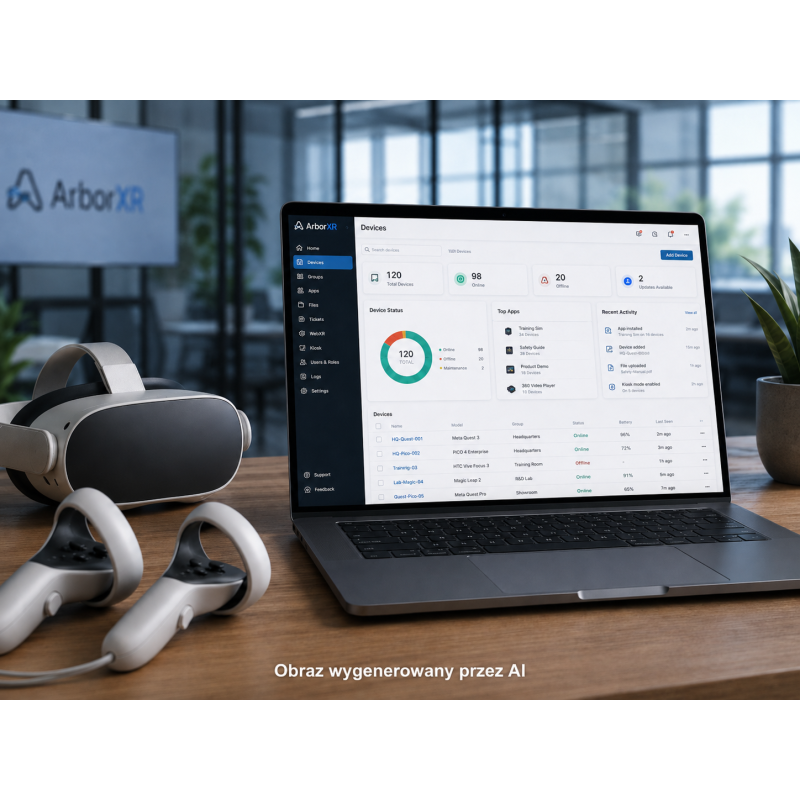
ArborXR is a cloud-based XR Device Management platform designed specifically for centrally deploying, configuring, securing, and managing fleets of VR (Virtual Reality), AR (Augmented Reality), and other Android-based devices.
ArborXR – a VR/AR/XR device management platform
ArborXR is a cloud-based XR Device Management platform designed specifically for centrally deploying, configuring, securing, and managing fleets of VR (Virtual Reality), AR (Augmented Reality), and other Android-based devices.
The solution serves as a specialized MDM (Mobile Device Management) system for XR, allowing administrators to manage devices from a web portal without requiring physical access to each device. ArborXR allows users to remotely install and update applications, configure devices, control user access, create kiosk modes, and monitor the status of deployed XR infrastructure.
The platform is designed for businesses, schools and universities, training companies, XR application developers, integrators, and organizations with fleets ranging from a few to large VR/AR headsets.
Key Features
Central management of a fleet of VR, AR, and XR devices;
Bulk device registration and configuration;
Organizing devices into groups and assigning tags;
Remote configuration of device settings;
Device status monitoring and inventory;
Remote device configuration updates;
Distribution of Android applications in APK format;
Distribution of videos, files, and WebXR content;
Remote application installation and updating;
Application version control;
Ability to roll back a device to a previous application version;
Monitor installation status;
Remote application launch;
Ability to store custom content in an external Amazon S3 API-compliant repository;
No application or file size limits declared by ArborXR for XR application distribution;
Single-App Kiosk Mode – device locking to a single designated application;
Video Kiosk Mode – automatic launch of selected video content;
ArborXR Home / Multi-App Launcher – a controlled interface that allows users to only use apps provided by the administrator;
Ability to restrict user access to device system settings;
Ability to secure settings with an administrator code;
Ability to customize the launch environment and branding;
Support for custom 3D environments and 360° backgrounds in higher plans;
Casting – device image streaming;
Remote Assistance – remote user support, including camera image streaming and two-way audio in supported configurations;
Device file system preview;
Tracking device locations in supported configurations;
Session and content usage analytics
Ability to schedule content updates;
API [Application Programming Interface] for integrating ArborXR with other systems;
Device SDK [Software Development Kit] for integrating applications with device management features;
Development process integration with CI/CD [Continuous Integration / Continuous Delivery] tools, such as GitHub or Jenkins, via the ArborXR CLI;
Device Operating Modes
Device Home Environment – the device manufacturer's standard environment; the user has access to the standard interface and applications;
ArborXR Home – an administrator-controlled launcher that replaces the standard device screen;
ArborXR Kiosk Mode – the device automatically launches a single application and prevents the user from exiting it;
Multi-App Launcher – the administrator defines the set of applications available to the user;
In-House Launcher – the ability to use a custom APK application as the device launcher;
For selected AR and Android devices, single- and multi-application kiosks based on the Android Lock Task Mode mechanism are also possible.
Specifications/Technical Requirements
Architecture: SaaS (Software as a Service) cloud platform;
ArborXR infrastructure: Google Cloud;
Admin portal accessible via a web browser;
Device Setup App available for Windows and macOS;
Windows 10 version 1607 or later required for Device Setup App;
macOS 10.14 or later required for Device Setup App;
ArborXR communication is primarily via HTTPS;
Primary required communication port: TCP 443;
Remote View also uses TURNS/TCP and may require port 5349;
Wi-Fi configuration and certificate support depends on the specific device model;
Device registration support via Device Setup App, QR Code, Batch Configuration, or manufacturer-provided mechanisms depends on the hardware model.
Supported Platforms and Devices
Meta Quest 1;
Meta Quest 2;
Meta Quest Pro;
Meta Quest 3;
Meta Quest 3S;
Oculus for Business devices;
PICO G2 4K;
PICO Neo 2;
PICO Neo 3 Pro;
PICO 4 Enterprise;
PICO 4 Ultra Enterprise;
PICO G3;
HTC VIVE Focus Plus;
HTC VIVE Focus 3;
HTC VIVE XR Elite;
HTC VIVE Focus Vision;
HTC VIVE Flow;
Samsung Galaxy XR;
Lenovo VRX;
DPVR devices;
Magic Leap 2;
Vuzix;
RealWear;
DigiLens ARGO;
Android phones and tablets.
Features may not be identical across all devices.
Security
Communication encryption using TLS 1.2 or higher;
Encryption of data stored in the infrastructure using AES-256 or better;
Encrypted storage of applications, videos, and other content;
Private content repositories not directly accessible from the public internet;
Short-lived API keys generated for upload/download operations;
OpenID Connect used in the authentication mechanism;
Option to integrate with a third-party identity provider using OAuth 2.0 or SAML 2.0;
Option to use SSO with the Enterprise plan;
Two-Factor Authentication;
Option to use your own Amazon S3 API-compliant repository;
Regular SAST [Static Application Security Testing] scanning;
DAST [Dynamic Application Security Testing] scanning;
Scanning of Docker images for vulnerabilities;
Checks against the OWASP Top 10;
Annual external penetration tests;
the ability to provide clients with penetration testing reports upon request.
ArborXR is a cloud-based XR Device Management platform designed specifically for centrally deploying, configuring, securing, and managing fleets of VR (Virtual Reality), AR (Augmented Reality), and other Android-based devices.