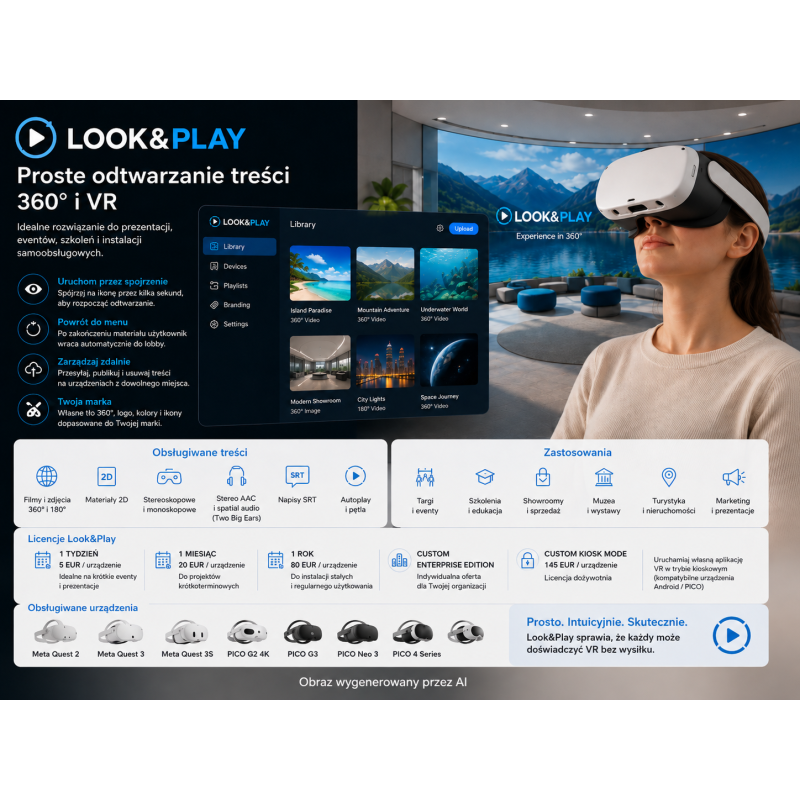
Look&Play is an application designed for easy and controlled playback of VR (Virtual Reality) content, primarily 360° and 180° videos and photos.
The solution is designed for applications where the user should use VR goggles without having to navigate complex menus.
Content can be launched by simply looking at an icon for a few seconds.
Look&Play – a platform for simple playback of 360° and VR content
Look&Play is an application designed for easy and controlled playback of VR (Virtual Reality) content, primarily 360° and 180° videos and photos.
The solution is designed for applications where the user should use VR goggles without having to navigate complex menus.
Content can be launched by simply looking at an icon for a few seconds.
After completing the content, the user is automatically returned to the virtual waiting room/selection screen.
The solution is suitable for presentations, trade shows, events, showrooms, training, education, museums, exhibitions, and other self-service applications.
The administrator can remotely upload content to devices using the online Look&Play panel.
It is also possible to manually pre-load content directly onto the device.
The application allows you to create a custom waiting environment with a custom 360° background, color, and logo.
Look&Play supports both stereoscopic and monoscopic content.
360°, 180°, and standard 2D content are supported;
stereo and surround sound are supported;
the app can run without a controller on select PICO devices, simplifying end-user use.
Key Features
360° video playback;
360° photo playback;
180° video and photo support;
2D content support;
monoscopic content support;
stereoscopic content support;
Over/Under stereoscopy support;
Side-by-Side stereoscopy support;
Equirectangular format support;
EAC [Equi-Angular Cubemap] support, used by YouTube, among others;
Subtitle support in SRT format;
AAC stereo audio support;
Two Big Ears surround audio support in .tbe format;
Automatic return to the menu after the end of the content;
Video looping capability;
Autoplay function with appropriate configuration;
Configurable behavior after removing the headset;
Pause the content;
Restart the content;
Automatic return to the virtual lobby;
Remote publishing and deletion of content;
Content management via the online Content Manager;
Ability to manually preload content;
Custom logo;
Custom 360° background;
Custom environment color;
Custom icons for content;
Kiosk Mode for supported devices;
Ability to automatically launch Look&Play when the headset is turned on;
Blocking the user from exiting the application in supported kiosk mode.
Supported Devices
Meta Quest 2;
Meta Quest 3;
Meta Quest 3S;
PICO G2 4K;
PICO G3;
PICO Neo 3;
PICO 4 Series;
The manufacturer states that support for the PICO 4 Ultra is planned.
Kiosk Mode – Compatibility
PICO G2 4K;
PICO G3;
PICO Neo 3 Series;
PICO 4 Series;
Older Oculus Go devices;
Selected Android smartphones;
Kiosk Look&Play Mode is not supported on the Meta Quest.
Video Specifications
Recommended codec: H.265 or H.264;
Recommended resolution: 3840 × 3840 px;
Recommended frame rate: 60 FPS (Frames Per Second);
Recommended bitrate: 50 Mb/s;
Supported 4K resolution;
Projection format: 360° Equirectangular;
Projection format: 180° Equirectangular;
Projection format: 360° Equi-Angular Cubemap;
Support for monoscopic content;
Support for over/under stereoscopic content;
Support for side-by-side stereoscopic content;
Support for standard 2D content;
Video file format: MP4.
Audio Specifications
Stereo AAC;
Two Big Ears surround sound;
Surround audio format: .tbe;
Sampling rate for .tbe: 44.1 kHz;
The manufacturer notes that surround audio playback performance may vary depending on the specific device.
Image Specifications
Supported format: JPG;
Supported format: PNG;
Recommended 360° photo resolution: 3840 × 3840 px;
360° images supported;
180° images supported;
2D images supported;
Stereoscopic and stereoscopic content supported.
Custom Background Specifications
Format: JPG or PNG;
Recommended resolution: 3840 × 3840 px;
360° backgrounds supported;
Stereoscopic or stereoscopic images supported.
Logo Specifications
Format: PNG;
Recommended resolution: 512 × 512 px;
Aspect ratio: 1:1;
Recommended transparent background.
Material Icon Specifications
Format: PNG;
Recommended resolution: 512 × 512 px;
Recommended aspect ratio: 1:1.
Content Management
Content can be uploaded via the web-based Look&Play Dashboard;
Content Manager allows you to publish and unpublish content on connected devices;
By default, the dashboard can upload up to 10 content;
Manual preloading is generally limited by the device's storage space;
The maximum size of a single file uploaded via the dashboard is 5 GB;
Larger files can be manually uploaded to the device;
After publishing, the content is downloaded by the device after launching Look&Play and connecting to the internet;
After unpublishing, the content will be deleted from the device the next time the app is launched and connected to the internet.
Installation
App available in Meta Quest stores;
App available in PICO stores;
Manual installation via APK file possible;
Kiosk Mode is installed as a separate application;
Kiosk Mode installation requires a compatible device;
Kiosk Mode installation requires a Windows computer;
Device connection to a computer is required;
Developer Mode must be enabled on the device.
Applications:
Product and service presentations;
Trade fairs;
Events;
Showrooms;
Real estate presentations;
Tourism;
Museums and exhibitions;
Training;
Employee onboarding;
Education;
Open days;
Marketing presentations;
360° promotional materials;
Self-service VR installations;
Projects where the headsets are to be operated by people with no prior VR experience.
Look&Play is not an MDM system similar to ArborXR. It is primarily a specialized player and 360°/VR content distribution system with a simple interface and an optional kiosk.
Look&Play is an application designed for easy and controlled playback of VR (Virtual Reality) content, primarily 360° and 180° videos and photos.
The solution is designed for applications where the user should use VR goggles without having to navigate complex menus.
Content can be launched by simply looking at an icon for a few seconds.