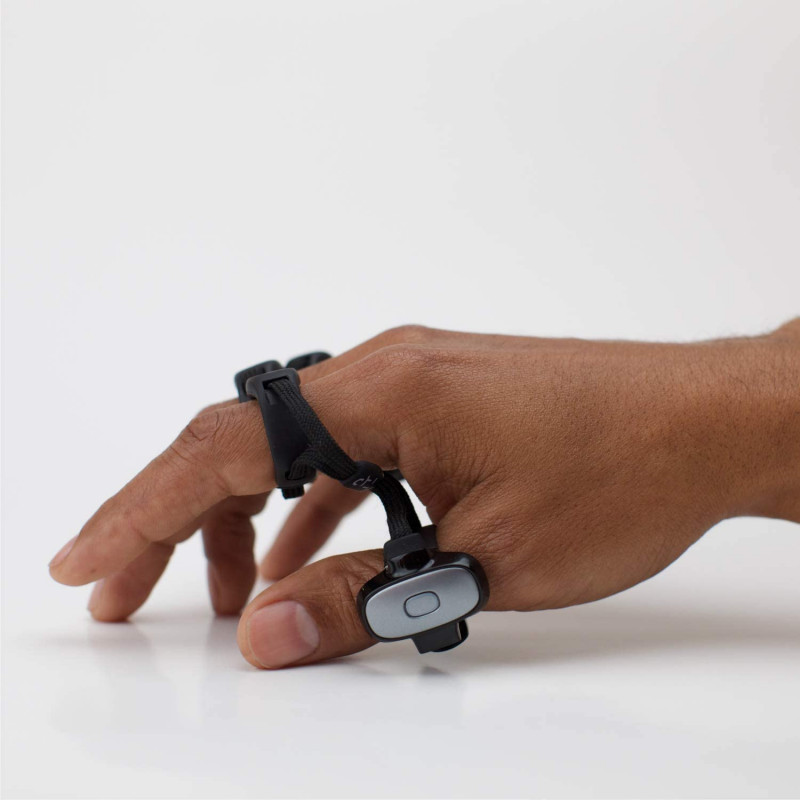
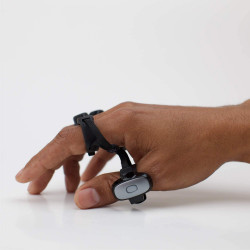

The Tap Strap 2 is a wearable finger controller that combines the functions of a keyboard, optical mouse, and AirMouse gesture controller. The device allows you to type, control the cursor, control multimedia, and navigate interfaces without using a traditional keyboard or mouse.
As you type, the Tap Strap 2 recognizes which fingers have touched the surface and then transmits the corresponding letter, character, or command to the connected device. Each finger arrangement represents a different command. The controller communicates via Bluetooth and is recognized by devices as a standard keyboard and mouse compliant with the Bluetooth HID profile.
TapWithUs Tap Strap 2 – Wearable Keyboard, Mouse, and Gesture Controller
The Tap Strap 2 is a wearable finger controller that combines the functions of a keyboard, optical mouse, and AirMouse gesture controller. The device allows you to type, control the cursor, control multimedia, and navigate interfaces without using a traditional keyboard or mouse.
As you type, the Tap Strap 2 recognizes which fingers have touched the surface and then transmits the corresponding letter, character, or command to the connected device. Each finger arrangement represents a different command. The controller communicates via Bluetooth and is recognized by devices as a standard keyboard and mouse compliant with the Bluetooth HID profile.
The Tap Strap 2 can automatically operate in three basic modes:
Keyboard Mode – enter letters, numbers, characters, and commands by touching the surface with appropriate finger combinations;
Mouse Mode – control the cursor using an optical mouse placed on the thumb ring;
AirMouse Mode – Control the cursor and selected device functions using hand movements and gestures performed in the air.
Changing between keyboard and mouse modes occurs automatically depending on the position of the hand and the contact of the thumb with the surface.
Worn-on Keyboard
The Tap Strap 2 consists of five flexible rings connected by woven nylon straps. Each ring contains a three-axis accelerometer, while the thumb module additionally houses a six-axis IMU, an optical mouse sensor, a vibration system, a battery, and control electronics.
Text can be entered on most hard and stable surfaces, such as a desk, table, armrest, or device case. However, the surface should not be too soft. Physical contact of the fingers with the surface is required for text entry.
The Tap Alphabet layout is the same for both hands. The appropriate hand configuration is selected in the TapManager app.
AirMouse Optical Mouse and Gesture Control
In optical mouse mode, the user moves their entire hand across a flat surface. Individual finger taps can be used to:
left, right, and middle mouse buttons,
scroll,
drag and drop,
and lock scrolling.
Cursor sensitivity and scrolling speed can be adjusted in the TapManager app. Settings are saved in the controller's memory and remain active when connected to another device.
AirMouse mode allows you to:
move the cursor using hand movements,
left- and right-click,
select and scroll content,
control music and video playback,
adjust the volume,
navigate the menu of a compatible Smart TV, and more.
Separate gesture sets are available for cursor control, multimedia control, and the Smart TV interface.
Customization with TapMapper
Using the free online tool TapMapper, you can customize finger combinations and create your own control layout.
This allows you to create configurations for things like:
writing in different languages,
programming,
handling keyboard shortcuts,
editing graphics and multimedia content,
controlling applications,
handling games,
running text macros, and creating custom commands.
The selected map is saved on the controller and remains available even after disconnecting it from the phone or connecting it to another device.
Applications
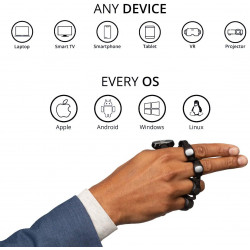
Tap Strap 2 can be used as a mobile controller for:
PCs and laptops,
smartphones and tablets,
VR, AR, and MR devices,
projectors,
Smart TVs,
multimedia devices,
presentations,
educational applications,
accessibility solutions,
controlling custom applications.
In VR, AR, and MR environments, the controller works with applications that support an external Bluetooth keyboard or mouse.
The manufacturer states that it can record up to 10 inputs per second and has a technical limit of 110 words per minute. However, actual typing speed depends on the user's skill level.
System Compatibility
According to the manufacturer's documentation, the Tap Strap 2 is compatible with, among others:
Windows 8.1 or later,
macOS OS X Yosemite or later,
Android 5.0 or later,
iOS 9.0 or later,
Ubuntu Linux,
ChromeOS,
devices supporting Bluetooth HID input.
Supported devices include computers, laptops, smartphones, tablets, projectors, smart TVs, Apple TV, Amazon Fire TV Stick, Xbox One, and select VR, AR, and MR headsets. Availability of individual features may depend on the operating system and the specific application's support for an external keyboard or mouse.
On iPhone or iPad, using the mouse function requires iOS 13 or later and AssistiveTouch enabled.
Includes:
Tap Strap 2 – wearable keyboard, mouse, and controller;
magnetic protective and charging case;
USB charging cable;
access to the TapManager app;
access to the TapMapper tool and user map library.
The manufacturer advises that units manufactured after 2022 come with a case that charges via USB-C. The case uses a magnetic mount and pogo pins to charge the controller.
Sizing
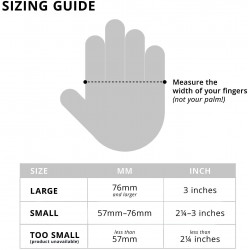
The Tap Strap 2 is available in two sizes:
Small – designed primarily for small to medium-sized hands;
Large – designed for medium to large hands.
If your measurement falls between two sizes, the manufacturer recommends choosing the larger size. The manufacturer recommends a minimum palm width of approximately 2.5 inches (5.7 cm).
Key Features
Keyboard, mouse, and gesture controller in one device;
One-handed operation;
Right- and left-handed compatibility;
Automatic keyboard and mouse mode switching;
Optical mouse for working on a flat surface;
Cursor and multimedia control using AirMouse gestures;
Configuration without installing special drivers;
Create your own layouts, macros, and shortcuts;
Supports up to three paired devices;
Compatible with computers, mobile devices, and select VR, AR, and MR systems;
Splash-resistant to IP42.
Specifications
Model: TapWithUs Tap Strap 2
Device Type: Wearable Keyboard, Optical Mouse, and Gesture Controller
Wearing Style: Five Finger Rings
Supported Hand: Right or Left
Operating Modes: Keyboard, Optical Mouse, AirMouse
Connectivity: Bluetooth
Required Host Device Bluetooth Standard: Bluetooth 4.0 or later
Communication Profile: Bluetooth HID – Keyboard and Mouse
Mouse: Built-in Optical Sensor
Motion Control: Six-axis IMU in the thumb ring
Finger Sensors: Three-axis Accelerometer in each ring
Feedback: Haptic Vibration
Maximum Number of Recorded Connections: Up to 3 Devices
Switching Between Devices: Using the Power Button
Maximum Number of Recorded Inputs: Up to 10 Inputs per Second
Declared Text Input Limit: Up to 110 Words Per Minute per Controller
Operating Time: Approximately 8–10 Hours depending on use
Standby time: up to 12 days
Full charge time: approximately 2 hours
Charging method: magnetic case with pogo pin contacts
Case charging connector: USB-C in current product versions
Ingress protection: IP42
Resistance: splash-proof; The device is not waterproof.
Ring material: Soft TPU
Ring connections: Braided nylon with signal wires
Available sizes: Small and Large
Control customization: TapMapper
Customization options: Custom button maps, shortcuts, languages, commands, and macros
Configuration app: TapManager
Developer tools: Bluetooth Low Energy API, SDK for iOS and Android, and Unity plugin
Windows compatibility: Windows 8.1 or later
macOS compatibility: OS X Yosemite or later
Android compatibility: Android 5.0 or later
iOS compatibility: iOS 9.0 or later
Mouse support on iPhone and iPad: Requires iOS 13 or later with AssistiveTouch enabled
Linux compatibility: Ubuntu Linux
ChromeOS compatibility: Yes
Supported devices: Computers, laptops, smartphones, Tablets, projectors, Smart TVs, and multimedia devices
VR, AR, and MR applications: Compatible with applications that support an external Bluetooth HID keyboard or mouse
Kit contents: Tap Strap 2, magnetic protective and charging case, USB cable for charging the case
Software access: TapManager app and TapMapper tool
Size Small: Designed primarily for small and medium-sized hands
Size Large: Designed primarily for medium and large hands
Recommendation when selecting the limiting size: Choose the larger variant
Minimum palm width recommended by the manufacturer: approximately 5.7 cm
The Tap Strap 2 is a wearable finger controller that combines the functions of a keyboard, optical mouse, and AirMouse gesture controller. The device allows you to type, control the cursor, control multimedia, and navigate interfaces without using a traditional keyboard or mouse.
As you type, the Tap Strap 2 recognizes which fingers have touched the surface and then transmits the corresponding letter, character, or command to the connected device. Each finger arrangement represents a different command. The controller communicates via Bluetooth and is recognized by devices as a standard keyboard and mouse compliant with the Bluetooth HID profile.