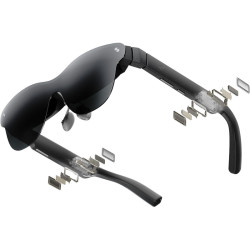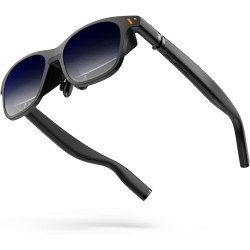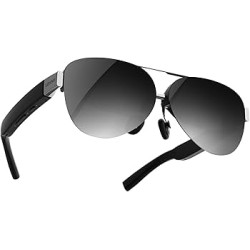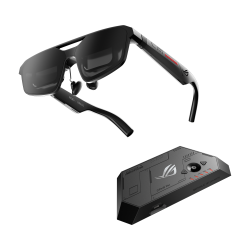
The ASUS ROG XREAL R1 is a wired AR (Augmented Reality) headset designed primarily as a portable display for gaming, movies, and visual work.
The device projects a virtual screen up to 171 inches in front of the user, equivalent to viewing from a distance of approximately 4 meters.
The glasses are compatible with PCs, consoles, ROG Ally devices, and select smartphones.
ASUS ROG XREAL R1 – gamingowe okulary AR
The ASUS ROG XREAL R1 is a wired AR (Augmented Reality) headset designed primarily as a portable display for gaming, movies, and visual work.
The device projects a virtual screen up to 171 inches in front of the user, equivalent to viewing from a distance of approximately 4 meters.
The glasses are compatible with PCs, consoles, ROG Ally devices, and select smartphones.
It is not a standalone computer or standalone VR (Virtual Reality) headset. A source device that transmits the image and provides power is required for operation.
Direct connection is via USB-C with DisplayPort Alt Mode support. Devices equipped only with HDMI or DisplayPort can be connected via the included ROG Control Dock.
The built-in spatial processing engine enables native 3DoF (Three Degrees of Freedom) operation without the need to install additional software. Two basic display modes are available:
- Anchor Mode – the screen remains anchored to a specific location in space;
- Follow Mode – the screen follows head movement and remains in front of the user.
The glasses also support real-time 2D-to-3D conversion and the Instant Sphere 360 and OmniView 360 spatial features.
The integrated Sound by Bose system provides directional audio, and the microphone array supports noise reduction.
The electrochromic lenses offer three levels of tint, allowing for improved image contrast in bright environments.
Technical Specifications
Display Technology: Sony Micro-OLED.
Panel Size: 0.55 inches.
Resolution: 1920 × 1080 pixels per eye.
Standard Refresh Rate: 120 Hz.
Maximum Refresh Rate: 240 Hz with Frame Rate Boost enabled.
Panel Response Time: 0.01 ms.
Motion-to-Photon Latency: 3 ms.
Maximum Brightness: 700 nits.
Color Gamut: 106% sRGB.
Field of View: 57°.
Angular Density: 40 PPD (Pixels Per Degree).
Claimed Image Size: Up to 171 inches at 4 meters.
3D Support: Yes.
Instant 3D Conversion: Yes.
Native Spatial Tracking: 3DoF.
Electrochromic dimming: three levels.
Automatic transparency adjustment: available in Anchor Mode.
Speakers: integrated, Sound by Bose.
Microphones: noise-canceling array microphone.
Sound reduction technology: phase cancellation.
Glasses connection: 1 × USB-C with DisplayPort Alt Mode.
Temporary earpiece angle adjustment: three levels.
Backlight: Aura RGB.
Dimensions: approximately 15.3 × 4.9 × 16.6 cm.
Glasses weight: approximately 90–91 g.
USB-C cable length: 1.2 m.
Glasses power consumption: less than 3 W.
Power consumption when docked: less than 7.5 W.
Built-in battery: none – glasses are powered by the connected device.
Visual comfort certifications:
TÜV Flicker Free;
TÜV Low Blue Light;
TÜV Eye Comfort AR.
ROG Control Dock
The ROG Control Dock is included in the standard product accessories list.
It allows you to connect your glasses to computers and consoles that do not support USB-C DisplayPort Alt Mode.
Dock ports:
2 x HDMI 2.0;
1 x DisplayPort 1.4;
1 x USB-C for data transfer and power;
1 x USB-C DC-IN 5V;
1 x front USB-C with DisplayPort Alt Mode.
Supported features:
HDR10;
GamePlus;
GameVisual;
input source switching;
control of surround settings and the on-screen menu.
Dock weight: approximately 230 g.
Dimensions: approximately 21.5 x 2.5 x 10 cm.
Available Models and Variants
The manufacturer lists one product model: ROG XREAL R1.
However, the glasses are available in two IPD (Interpupillary Distance) ranges:
IPD 63 – recommended IPD range from 57 to 66 mm;
IPD 69 – recommended IPD range from 66 to 75 mm.
These versions do not differ in performance or features. The difference lies in the optical geometry and how the image is adjusted to the user.
Those who fall between these ranges should test both variants before purchasing.
Nose pads in sizes M and L are included.
The temples offer three levels of angle adjustment and a spring mechanism to adjust them to the shape of the head.
A frame is included for mounting custom-made prescription lenses.
Hardware Compatibility
Direct connection is possible with devices supporting USB-C DisplayPort Alt Mode.
The manufacturer lists the following devices:
- ROG Ally and compatible mobile devices;
- PCs and laptops with a compatible USB-C port;
- iPhone 15 and iPhone 16;
- selected flagship Android smartphones.
The ROG Control Dock can be used to connect devices such as:
- desktop computers;
- PlayStation 5;
- Xbox consoles;
- Nintendo Switch used with the original docking station.
The glasses essentially function as an external display, allowing them to display games and applications running on the connected device.
The maximum 240 Hz is not available with all display sources. ROG Ally and appropriately equipped gaming computers can support high frequencies, while smartphones and the Nintendo Switch may be limited to 60 Hz.
Software Required for Operation
For basic operation of the glasses as an external display, installing a dedicated app is not required.
Anchor Mode is processed by the built-in X1 chip, so it does not require software tracking of the image from a computer or smartphone.
The optional ASUS DisplayWidget Center software allows you to:
adjust brightness and contrast;
change the refresh rate;
set virtual screen parameters;
organize the layout of spatial displays;
enable selected gaming features;
receive firmware update notifications.
DisplayWidget Center Requirements:
Windows 11 or later;
macOS 12 Monterey or later.
For ROG Ally devices, the official ASUS website and the global availability announcement indicate integration with Armoury Crate SE. This app will provide access to features such as dimming adjustment, Frame Rate Boost, spatial locking, and 3D mode. ASUS lists Armoury Crate SE 2.2.10.0 as the version ready for glasses support. However, the official XREAL FAQ contradicts the statement that glasses settings should be managed through DisplayWidget Center, not Armoury Crate. Therefore, integration with Armoury Crate SE should be considered device, app, and firmware version dependent and should be verified before being offered to customers as a guaranteed feature.
Advantages
Very high refresh rate of up to 240 Hz.
Very fast panel response time of 0.01 ms.
Full HD resolution per eye.
Large 57° field of view and a virtual image with a declared size of up to 171 inches.
Native 3DoF mode works without the need to install additional software.
Ability to anchor the screen in space.
Supports computers, mobile devices, smartphones, and consoles.
ROG Control Dock included, enabling use with HDMI and DisplayPort sources.
Three levels of electrochromatic lens dimming.
No need to charge a separate battery.
Integrated Sound by Bose speakers and noise-canceling microphones.
Custom prescription lenses available.
Small footprint compared to a physical monitor.
TÜV certifications for flicker reduction, blue light reduction, and eye comfort.
Disadvantages and Limitations
The glasses are not a standalone device – they require a computer, console, smartphone, or other image source.
The connection is wired. The manufacturer does not claim wireless image transmission.
The lack of a built-in battery means they draw power from the source device, which may reduce the operating time of the smartphone or mobile device.
Not every USB-C port transmits the image. The source device port must support DisplayPort Alt Mode.
The 240 Hz frequency is not available with all devices.
At 240 Hz, the manufacturer advises that there may be a slight decrease in text readability due to the image processing algorithms used.
The USB-C cable has a fixed length of 1.2 m, designed for stable transmission at a high refresh rate.
It is necessary to select the correct IPD variant. An incorrect size may hinder achieving a sharp and properly centered image.
People with visual impairments may require additional corrective lenses.
Despite the directional audio system, sound may be partially audible to others. The manufacturer recommends headphones for quiet environments or when complete privacy is required.
The glasses should not be used in situations where limited awareness of surroundings could pose a threat.
The claimed 171-inch screen size is an equivalent perceived image size, not a physical screen of that diagonal.
The official documentation contains inconsistent information regarding integration with Armoury Crate SE.
The ASUS ROG XREAL R1 is a wired AR (Augmented Reality) headset designed primarily as a portable display for gaming, movies, and visual work.
The device projects a virtual screen up to 171 inches in front of the user, equivalent to viewing from a distance of approximately 4 meters.
The glasses are compatible with PCs, consoles, ROG Ally devices, and select smartphones.