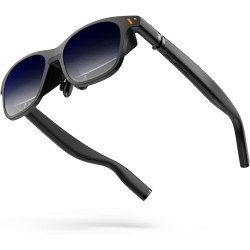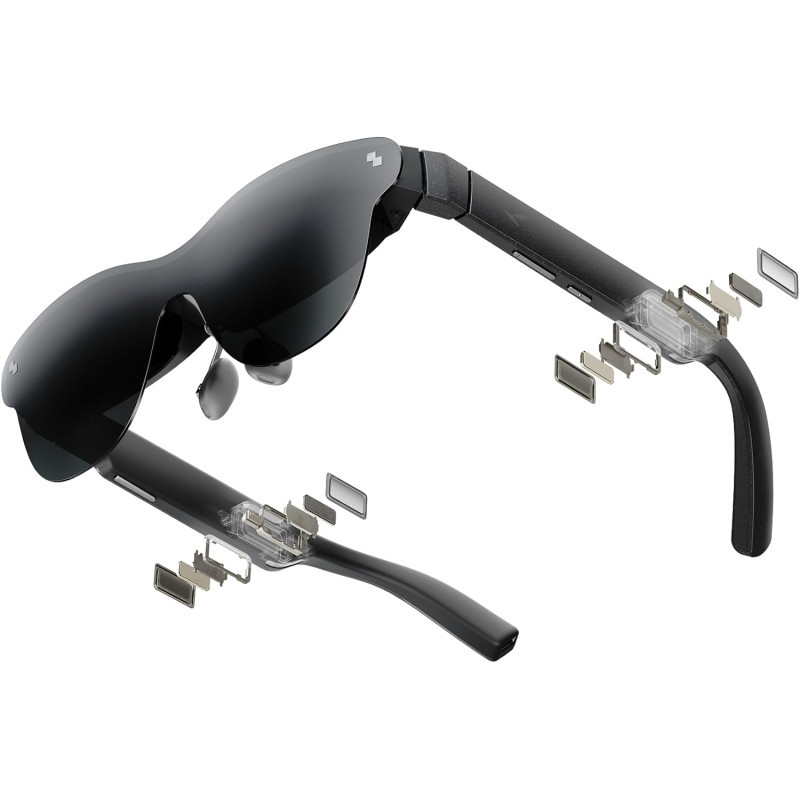
The RayNeo Air 4 Pro are lightweight XR/AR glasses that function as a private, portable display. When connected to a compatible smartphone, tablet, laptop, or console, they project a virtual screen up to 201 inches in size, equivalent to viewing from a distance of approximately 6 meters.
RayNeo Air 4 Pro Standard Edition – Standard version.
The RayNeo Air 4 Pro are lightweight XR/AR glasses that function as a private, portable display. When connected to a compatible smartphone, tablet, laptop, or console, they project a virtual screen up to 201 inches in size, equivalent to viewing from a distance of approximately 6 meters.
The device is primarily intended for watching movies, gaming, displaying 3D content, and using an additional screen while working. The Air 4 Pro is not a standalone computer or standalone AI assistant. The glasses require a wired connection to a USB-C source device with DisplayPort Alt Mode support. They do not have their own battery or wireless connectivity.
Technical Specifications
Device Type: Wired XR/AR glasses – personal head-mounted display.
Display Technology: 0.6-inch SeeYa Micro-OLED.
2D Image Resolution: 1920 × 1080 pixels.
3D Image Resolution: 3840 × 1080 pixels in Side-by-Side (SBS) mode.
HDR Support: HDR10.
Image Processor: Vision 4000.
Image Enhancement: Real-time SDR to HDR conversion.
Content Conversion: Ability to convert selected 2D photos and videos to 3D using the app.
Declared Virtual Screen Size: Up to 201 inches at a viewing distance of approximately 6 meters.
Field of View (FOV): Approximately 46°.
Refresh Rate: Up to 120 Hz. Eye-level brightness: up to 1200 nits.
Contrast ratio: 200,000:1.
Color gamut coverage: 145% sRGB and 98% DCI-P3.
Color accuracy: ΔE less than 2.
Display density: approximately 49 PPD [Pixels Per Degree – pixels per degree of view].
Brightness adjustment: 20 levels.
Picture modes: Standard, Game, Movie, Eye Protection, Professional, and Vision Boost.
PWM dimming: 3840 Hz.
Eye protection: TÜV SÜD Low Blue Light and Flicker-Free certifications.
Audio system: Four speakers tuned in collaboration with Bang & Olufsen.
Sound modes: Standard, Surround, and Whisper Mode. Optional audio accessory: Sound Tube for enhanced directionality and sound level.
Connection: Wired USB-C with DisplayPort Alt Mode.
Wi-Fi connectivity: None.
Bluetooth connectivity: None.
Built-in battery: None – glasses are powered by the connected device or adapter.
Weight: 76 g.
Dimensions: Approx. 176.5 x 154.3 x 47.4 mm.
Vision correction: Magnetic frame for custom-made prescription lenses.
Fit adjustment: Interchangeable and adjustable nose pads and adjustable temple positions.
The manufacturer also offers bundles containing glasses and additional accessories:
Air 4 Pro + JoyDock – a bundle designed for use with Nintendo Switch consoles, among other things.
Air 4 Pro + Pocket TV – a bundle with an external multimedia device.
Air 4 Pro + HDMI Adapter – for devices sharing video via HDMI.
Air 4 Pro + USB-C bundle.
Compatibility
The smartphone, tablet, or computer must support video streaming via USB-C.
Look for the following in the device's specifications: DisplayPort over USB-C, DP Alt Mode, Alt DP over USB-C, or Thunderbolt 4.
Select iPhones from the iPhone 15 series can be connected directly via USB-C.
Older iPhones with a Lightning port require an additional adapter.
Devices with HDMI output, such as select consoles or computers, require an active HDMI to USB-C adapter designed for the glasses.
The USB-C port itself does not guarantee compatibility – it must support video streaming. Some Google Pixel smartphones can display the image, but the manufacturer states that they do not support the RayNeo XR app. The glasses do not connect wirelessly. A USB-C cable is required for operation.
Software Required for Operation
Basic Display
The RayNeo app is not required for basic screen mirroring.
When the glasses are connected to a compatible device, they are recognized as an external display.
Videos, games, documents, and applications run on the source device, and the glasses only display the displayed image.
A RayNeo account or internet connection is not required for basic operation.
RayNeo XR App
The RayNeo XR app is optional and is used for, among other things:
managing glasses settings;
operating XR spaces;
viewing 3D SBS content;
converting 2D photos and videos to 3D;
managing multimedia content;
updating and optimizing selected device features.
Requirements:
Android 8.0 or later;
smartphone with DisplayPort and 3D support;
For iPhone: iOS 17.2 or later and a USB-C device, optimized primarily for the iPhone 15 series and newer.
The RayNeo XR app is available free of charge. In the Polish App Store, its interface is marked as available in English only. The manufacturer does not confirm the Polish version of the interface.
Firmware Update
You can update or repair the glasses' firmware on your computer using Chrome or Opera.
The manufacturer guarantees lifetime firmware updates and a one-year hardware warranty.
The RayNeo Air 4 Pro are lightweight XR/AR glasses that function as a private, portable display. When connected to a compatible smartphone, tablet, laptop, or console, they project a virtual screen up to 201 inches in size, equivalent to viewing from a distance of approximately 6 meters.