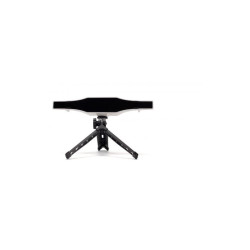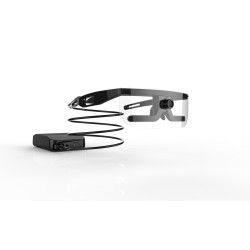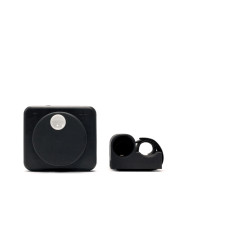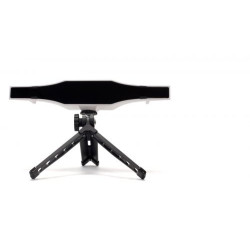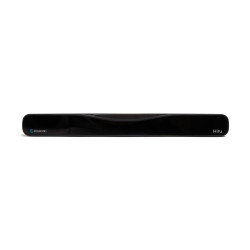
The IrisBond Hiru is an external eye tracker that uses infrared light to determine the user's gaze direction. The device converts eye movements into cursor position, allowing users to operate a computer or tablet without using a traditional mouse or touchscreen.
IrisBond Hiru Eyetracker
The IrisBond Hiru is an external eye tracker that uses infrared light to determine the user's gaze direction. The device converts eye movements into cursor position, allowing users to operate a computer or tablet without using a traditional mouse or touchscreen.
Hiru was designed primarily as an AAC (Augmentative and Alternative Communication) solution and device access for individuals with limited mobility or communication difficulties. It can be used to operate communication apps, on-screen keyboards, browsers, multimedia, educational software, and other programs available on Windows and iPadOS.
Eye tracking is performed using the "dark pupil" method, using infrared light reflections from the cornea. Eye tracking calculations are performed directly on the Hiru device, and processed gaze position information is transmitted to the computer or tablet.
The device is MFi [Made for iPad] certified, confirming the accessory's compliance with Apple requirements. According to the manufacturer, Hiru is also a Class I medical device compliant with the MDR [Medical Device Regulation – EU Regulation 2017/745 on medical devices].
Technical Specifications
Device Type: External eye tracker mounted under the screen.
Primary Purpose: AAC, computer access, and device control using gaze.
Tracking Technology: Dark Pupil method and proprietary IrisBond algorithms.
Light Source: Infrared.
Data Processing: Directly within the Hiru device, using on-chip technology.
Eye Tracking: Monocular or Binocular.
Declared Accuracy: 0.4°.
Sampling Rate: 30 to 60 Hz.
Recommended Screen Size: 10 to 20 inches.
Recommended User-Device Distance: 37 to 75 cm.
Typical Working Distance as indicated in the Positioning Guide: Approximately 55 cm.
Headbox: 20 x 18 cm at a distance of 50 cm.
Recommended Position: Device placed under the screen, with the user's eyes approximately level with the top of the screen. Available calibration options: 5-, 9-, or 16-point.
Additional adjustment: single-point calibration fine-tuning.
Confirmation methods:
dwell – keeping your gaze on the selected object for a specified period of time,
blink – a conscious blink,
switch – an external button or switch.
Pointer operation: cursor movement, clicks, scrolling, and using the on-screen keyboard, depending on the software used.
Dimensions: 259 × 25 × 28 mm.
Weight: 115 g.
Device connector: USB-C.
Required host device interface: USB 3.0.
Mounting: holder, magnetic strips, or a dedicated adapter or case.
Connection: wired; Hiru is not a wireless device or a standalone tablet.
Minimum requirements for a Windows computer
Currently recommended operating system by the manufacturer: Windows 11 Pro.
Processor: Minimum 1.33 GHz.
RAM: Minimum 8 GB.
Device storage: Minimum 128 GB.
Free space for software: Manufacturer also recommends approximately 3 GB.
Graphics: Intel Graphics, Nvidia, or other card supporting OpenGL 2.0.
Port: USB 3.0.
Recommended devices: Microsoft Surface Pro 7+ and Surface Pro 10.
ARM processors: Currently not officially supported.
Currently recommended Apple devices:
iPad Pro 12.9-inch, 6th generation.
iPad Air 13-inch with M2 processor.
iPad Air 13-inch with M3 processor.
Recommended system: iPadOS 17.6 or later. A compatible MFi-certified hub or adapter may be required for connection, e.g., the manufacturer-specified Satechi hub.
Software Required for Operation
Windows
IrisBond EasyClick
Software for full visual computer operation.
Provides click, double-click, drag, scroll, and on-screen keyboard functionality.
This is the manufacturer's recommended accessibility program for Hiru.
This is not always necessary when using an AAC program that natively integrates with Hiru or the Windows Eye Control feature.
IrisBond Systray
A program for updating the device's firmware.
Checks for new versions of the Hiru firmware.
Enables HID [Human Interface Device] mode, required for Windows Eye Control.
The manufacturer recommends Systray be permanently installed on your Windows device.
Windows Eye Control
A built-in Windows accessibility feature.
It can work with Hiru via the Microsoft HID protocol.
To use it with Hiru, HID mode must be enabled in IrisBond Systray and calibration must be performed.
Optional Communication Software
Hiru has documented integration with, among others:
Grid 3,
Mind Express 5,
EasyClick,
programs using the Microsoft HID standard.
These programs are not part of the operating system itself and may require a separate license.
iPadOS
Hiru App
Free IrisBond app available in the App Store.
Used to calibrate the device.
Allows you to change tracking settings.
Used to activate the Hiru license.
Allows you to update the firmware.
An internet connection is required to register the license for the first time and to download updates.
AssistiveTouch
The built-in iPadOS accessibility feature.
Must be enabled to control the iPad interface with glances.
Provides access to features such as taps, gestures, scrolling, and the on-screen menu.
No additional app purchase required.
Optional AAC Apps
Hiru can work with communication apps such as Predictable 6, TouchChat, and other apps that support iPadOS accessibility features or direct integration with Hiru.
Communication apps are tailored to the user's needs and typically require a separate license or purchase.
The IrisBond Hiru is an external eye tracker that uses infrared light to determine the user's gaze direction. The device converts eye movements into cursor position, allowing users to operate a computer or tablet without using a traditional mouse or touchscreen.