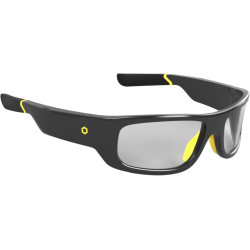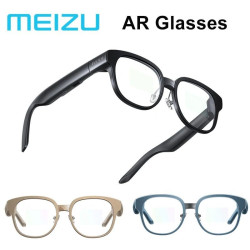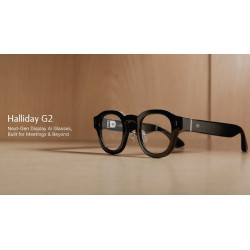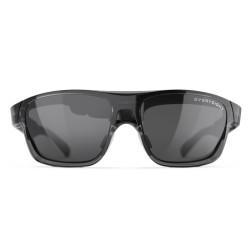
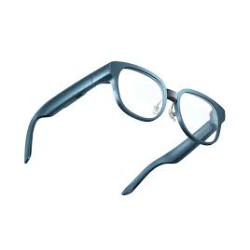
MyView Caption Glasses are smart glasses that support communication, designed primarily for the deaf and hard of hearing, but also for business meetings, learning, travel, and presentations.
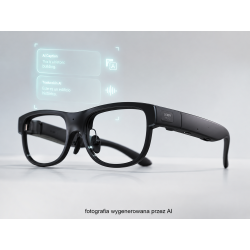
Built-in microphones record the speaker's speech, and the system converts speech to text displayed directly in the user's field of view.
MyView Caption Glasses are smart glasses that support communication, designed primarily for the deaf and hard of hearing, but also for business meetings, learning, travel, and presentations.
Built-in microphones record the speaker's speech, and the system converts speech to text displayed directly in the user's field of view.
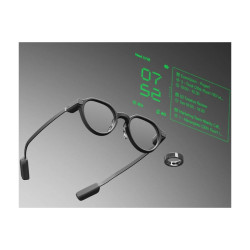
Captions are presented on a binocular display, meaning they are displayed simultaneously for both the right and left eye.
The glasses enable conversation transcription, translation, navigation, notification display, and teleprompter functionality. Depending on the model, captioning during phone calls, music playback, and an artificial intelligence assistant are also available.
Speech processing requires an internet connection, as voice recognition is performed in the cloud. The glasses connect to a smartphone via Bluetooth, and the phone provides access to Wi-Fi or a data connection.
Available Models
MyView Glasses 1
- The first generation of glasses, focused on transcribing and translating face-to-face conversations.
- Transcription and translation in 13 languages:
English,
German,
French,
Italian,
Spanish,
Russian,
Malay,
Vietnamese,
Chinese,
Japanese,
Indonesian,
Thai,
Turkish.
- Features:
real-time speech transcription,
conversation translation,
navigation,
teleprompter,
notifications,
music playback,
artificial intelligence assistant.
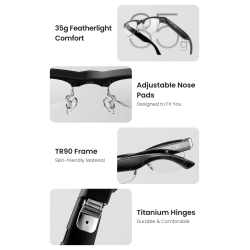
- Weight: 43 g.
- Dimensions: 144 × 164 × 43 mm.
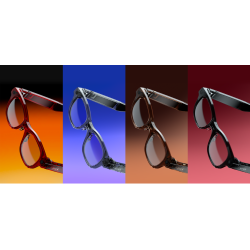
- Available colors: black and blue.
- Display: MicroLED. - Image displayed for both eyes.
- Resolution: 640 × 480 pixels per eye.
- Brightness: up to 2000 nits.
- Field of view: 30°.
- Optical system: single green light module with a volume of 0.15 cm³.
- Battery: 204 mAh.
- Declared operating time: up to approximately 10 hours.
- Charging and data transmission: USB-C.
- Microphones: dual microphone array.
- Built-in speakers with a noise reduction feature.
- Noise reduction during calls.
- Teleprompter supports TXT files in UTF-8 format, up to 10 MB in size.
- Control via touchpad, voice, or optional smart ring. -Compatibility: Android 13 or later, iOS 16 or later, HarmonyOS 3.0 or later.
MyView Glasses 2
- Second generation, enhanced with captions during phone calls and additional accessibility features.
- Real-time transcription:
face-to-face conversations,
phone calls,
support for 15 languages.
- Real-time translation: 13 languages.
- Two additional languages compared to the first generation are Arabic and Korean, however, the manufacturer assigns 15 languages to transcription and only 13 to translation.
Polish is not included in either of these groups.
- Features:
captions during direct calls,
captions during phone calls,
conversation translation,
Hearing Assistance Mode,
navigation,
teleprompter and meeting assistant,
music playback,
artificial intelligence assistant,
MyView Ring compatibility.
- Weight: 44 g.
- Titanium alloy construction. - Scroll wheel controls:
press – confirm,
hold – return to the home screen,
double-tap – cancel or return,
swipe – change selection.
- Adjustments:
vertical and horizontal text position,
font size,
half-screen or full-screen mode.
The MyView 2 public website does not provide complete technical specifications regarding resolution, battery capacity, battery life, Bluetooth version, or minimum phone system version. Do not automatically assign MyView 2 parameters to MyView 1.
Software Required for Operation
- A smartphone connected to the glasses via Bluetooth is required for operation.
- The smartphone must have internet access via Wi-Fi or a cellular network.
- According to the manufacturer, the MyView app itself is not required to enable basic captions, but is necessary or useful for more comprehensive device management.
- The app allows you to:
manage saved transcripts,
change display settings,
change caption settings,
select a language,
check the device status.
- Basic functions can also be controlled directly from the touch panel or the scroll wheel located on the frame.
- The manufacturer does not provide a clear link to the official app card on Google Play or the Apple App Store on the public product page.
We were unable to independently confirm:
the full name of the app available in European stores,
its availability for accounts in the Polish region,
the interface language,
required permissions,
the update policy,
the current compatibility of MyView 2.
In the case of MyView 1, the manufacturer states compatibility with Android 13, iOS 16, and HarmonyOS 3.0 or later versions.
Polish Language Support
Polish is not currently officially supported.
MyView Glasses 1 does not support speech transcription in Polish.
MyView Glasses 1 does not officially translate speech from or into Polish.
MyView Glasses 2 also does not list Polish among the 15 transcription languages or 13 translation languages.
This feature is not available after purchasing an additional package. The manufacturer does not currently offer a separate, paid Polish language module.
In practice, this means that Polish speakers should not expect correct generation of Polish subtitles.
The manufacturer also does not officially document the ability to connect an external service, such as Google Translate, Microsoft Translator, or another Polish speech recognition system.
For users requiring Polish transcription, the product in its current version is not a suitable standalone solution.
How is the translation performed?
Translation is primarily provided in the form of text subtitles displayed on the glasses. The operating system works as follows:
Microphones in the glasses record the speech,
the sound is transmitted to the speech recognition system,
processing is performed using a cloud service,
the system performs automatic speech recognition (ASR),
the speech is converted to text,
in translation mode, the text is translated into the selected target language,
the result appears on the binocular display.
In standard transcription, the spoken language and the subtitle language are the same.
In translation, the source language and the subtitle language are different.
For example, the interlocutor speaks English and the user selects German—German text appears in the field of view.
MyView 2 can also convert speech from a phone call into subtitles.
Official MyView materials do not explicitly confirm that the glasses pronounce the translated response aloud for the user.
It is safest to classify the solution as an automatic speech-to-text translation, rather than a full two-way voice translator replacing a human translator.
Privacy Information:
Selected device functions may involve recording images or sound and transmitting data to external services. Before deploying the device within an organization, it is necessary to verify the application configuration, the scope and location of data processing, the legal basis for the intended use, and the requirements regarding the notification of individuals whose data may be recorded.
MyView Caption Glasses are smart glasses that support communication, designed primarily for the deaf and hard of hearing, but also for business meetings, learning, travel, and presentations.
Built-in microphones record the speaker's speech, and the system converts speech to text displayed directly in the user's field of view.