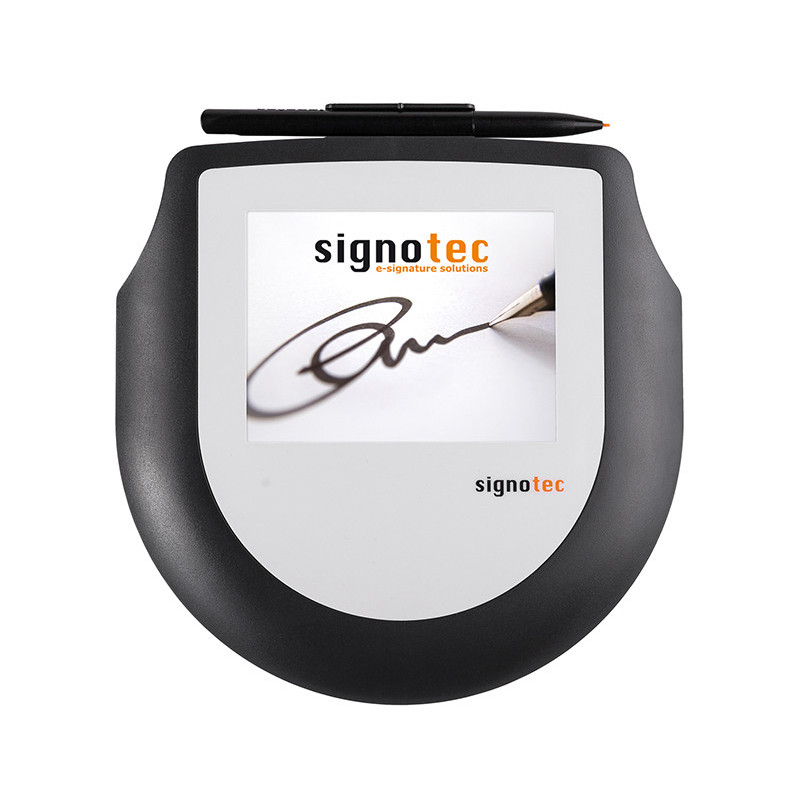
The Signotec Sigma is a compact pad for electronically capturing handwritten signatures. The device features a 4-inch monochrome screen, which displays the signature as it is created, and a resistive touch panel (RTP) that responds to stylus pressure. The pad captures movement coordinates, pressure, and time, creating 4D.
EOL - end of production
Signotec Sigma
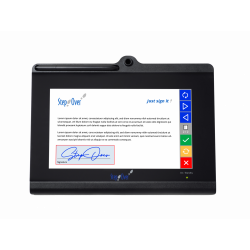
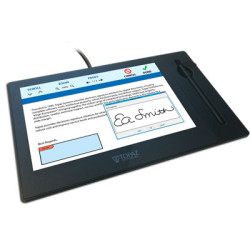
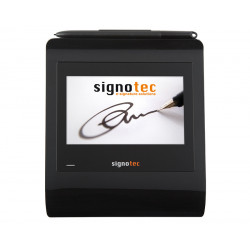
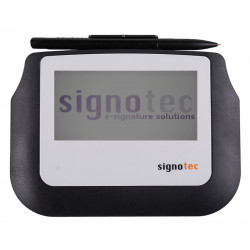
The Signotec Sigma is a compact pad for electronically capturing handwritten signatures. The device features a 4-inch monochrome screen, which displays the signature as it is created, and a resistive touch panel (RTP) that responds to stylus pressure. The pad captures movement coordinates, pressure, and time, creating 4D samples: x, y, z, t, where "z" represents pressure force and "t" represents time.
The Sigma is designed primarily for customer service, reception, administration, banking, insurance, healthcare, and mobile service desks. Thanks to its small size, it can be used both stationary and in the field. The backlit version is better suited to changing lighting conditions.
The pad is not a standalone document workflow system. Compatible software or integration via API/SDK is required to sign PDF files, save signatures, or transfer them to a CRM, ERP, or industry-specific application.
Technical Specifications
Device type: Handwritten signature pad,
Screen: 4″ monochrome TFT, approximately 10.4 cm,
Screen resolution: 320 × 160 pixels,
Viewable screen area: 95 × 47 mm,
Backlight: optional, brightness 158 cd/m²,
Document scrolling function on the pad: none,
Sensor technology: Resistive Touch Panel (RTP),
Active signature area: 91 × 45 mm,
Sensor resolution: 4096 × 4096 points,
Pressure levels: 1024,
Data transfer rate: 500 Hz,
Internal sampling rate: 6000 samples per second,
Recorded data: x/y position, pressure, and time,
Stylus: passive, battery-free, with replaceable spring tip,
Stylus tilt angle detection: none,
Stylus over-surface detection: none,
Estimated surface durability: approximately 1 million signatures,
Estimated stylus durability: approximately 150,000 signatures under manufacturer's test conditions,
Surface hardness: 3H,
Basic communication: HID-USB and WinUSB,
Optional communication: FTDI/VCOM, USB–Ethernet adapter, or Citrix Virtual Channel,
Cable length: approximately 2 m; 5 m optional,
Power supply: directly from the USB port,
Power consumption: approximately 45 mA without backlight and approximately 165 mA with backlight,
Dimensions according to the latest data sheet: 155 × 125 × 13 mm,
Weight: approximately 230 g including cable,
Status LEDs: two programmable LEDs,
Protection rating: IP52,
Operating temperature: -10°C to +60°C,
Operating and storage humidity: up to 90%, non-condensing,
Security
The device supports the following signature data security mechanisms:
AES-256 secured data transmission,
key exchange using RSA,
RSA encryption module located within the pad,
RSA signature generation within the device,
certificate creation and storage within the pad,
RSA keys up to 4096 bits,
SHA-1, SHA-256, and SHA-512 hash functions,
Secure Mode, which allows for real-time signature display without sharing useful biometric data with the application,
firmware memory protection against data read-out.
The extent of these security features depends on the integration method, the API used, and the document management software. Simply connecting the device does not automatically enable all cryptographic mechanisms.
Software Required for Operation
Basic USB Connection
In the standard HID-USB/WinUSB version, the device operates as a Plug and Play device, and the manufacturer does not require the installation of a special driver, except for the pad's recognition by the system. However, an application that can communicate with the device and capture the signature is required.
If the system you're using, such as a banking, healthcare, ERP, or customer service application, already has built-in support for signotec pads, additional software may not be necessary.
signoSign/2 Lite
The manufacturer includes free signoSign/2 Lite software for basic PDF document management and signing. The Lite version includes the most important basic functions, but not the full range of automation and advanced document processes.
signoSign/2 Pro
The paid signoSign/2 Pro version is designed for more advanced processes, such as:
signing and processing PDF documents,
acquiring documents from applications that use the print function,
automatic document data analysis,
defining file names and locations,
integration with more complex document workflows,
using additional modules and plug-ins.
API and SDK
For integrating the device with your own software, the manufacturer offers several SDKs (Software Development Kits), libraries and programming tools that enable pad control, signature data retrieval, and cryptographic functions. Solutions are available for Windows, Linux, and Java environments, but detailed compatibility should be verified for the specific API version.
FTDI/VCOM
The FTDI version creates a virtual VCOM serial port in the system. It is primarily intended for terminal, Remote Desktop, and Citrix environments. A free FTDI driver is required for operation.
The connection option is hardware-determined at purchase. The standard USB version cannot be software-switched to FTDI/VCOM or vice versa.
Hardware and System Requirements
Minimum requirements for the pad itself:
A computer or terminal with a free USB port,
An application that supports signotec devices or a suitable SDK/API,
Windows 10 or later, Windows Server 2016 or later, or a compatible Linux environment,
In an RDP or Citrix environment: a suitable FTDI/VCOM variant, a VCOM driver, or the optional Citrix Virtual Channel,
For networking: an optional USB-to-Ethernet adapter.
The pad is USB-powered and therefore does not require a separate power supply. However, the port should provide standard USB power, especially in the backlit version.
signoSign/2 Requirements
The current version of signoSign/2 is a 64-bit application for:
Windows 10,
Windows 11,
Windows Server 2019,
Windows Server 2022,
Windows Server 2025.
Minimum configuration:
Dual-core processor,
4 GB RAM,
approximately 500 MB of free space,
A screen resolution of at least 1280 x 720,
Microsoft .NET Framework 4.8,
Local administrator privileges required during installation.
Recommended configuration:
Quad-core processor or better,
At least 8 GB RAM,
At least 1 GB of free space,
A screen resolution of 1920 x 1080 or higher.
Hardware compatibility with Linux does not imply the availability of signoSign/2 for Linux. In such an environment, an application with appropriate integration or the use of an API/SDK provided by the manufacturer is necessary.
The Signotec Sigma is a compact pad for electronically capturing handwritten signatures. The device features a 4-inch monochrome screen, which displays the signature as it is created, and a resistive touch panel (RTP) that responds to stylus pressure. The pad captures movement coordinates, pressure, and time, creating 4D.