
Acesight – electronic glasses supporting people with low vision
Acesight is a series of electronic head-mounted devices intended for people who retain some vision but, due to eye disease, have difficulty recognizing faces, reading, watching television, using a computer or carrying out everyday activities.
The devices were developed by Zoomax Technology. The official Acesight range currently includes three models: Acesight, Acesight S and Acesight VR. They differ in design, features and suitability for use while moving around.
What are Acesight electronic glasses?
Acesight devices are not traditional prescription glasses. They do not correct vision using lenses and do not treat eye diseases. They are electronic vision assistance systems that:
capture an image using a camera,
process it in real time,
magnify selected elements,
increase contrast,
enhance object outlines,
display the modified image on screens positioned in front of the user's eyes.
The solution is designed to make use of the user's remaining vision. This means that Acesight does not restore sight to a completely blind person, but may make residual vision more useful in certain situations.
How do Acesight glasses work?
A camera at the front of the device observes the surroundings. The image is then processed and displayed in front of the user's eyes. Depending on individual needs, users can choose a natural full-color image, magnification, a high-contrast mode or enhanced outlines.
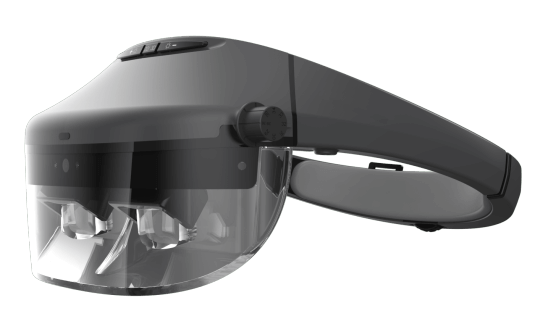
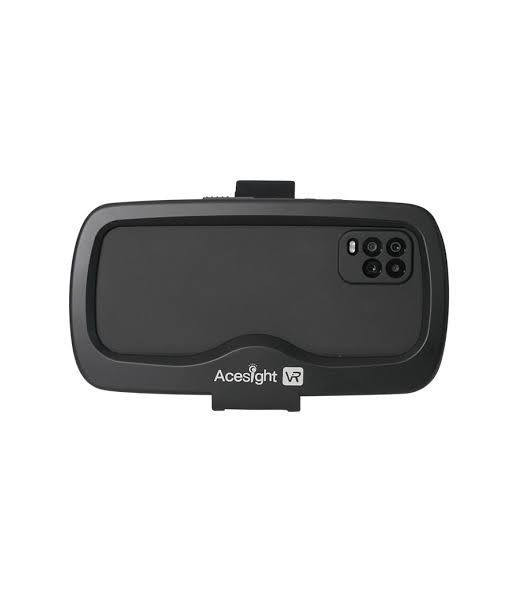
Image magnification
Users can electronically magnify an observed object. This feature can help with, among other things:
reading signs and documents,
watching television,
recognizing faces,
viewing a classroom board,
using a computer screen,
watching sporting events.
Acesight and Acesight S provide magnification from 1.1× to 15×, while Acesight VR offers 1× to 16×.
High-contrast modes
The devices can convert the image into color combinations that make it easier to distinguish text from its background, for example:
white text on a black background,
black text on a white background,
yellow text on a black background,
black text on a yellow background.
The Acesight model offers ten contrast combinations, while Acesight S and Acesight VR each offer four basic combinations. Individual colors may work differently depending on the type of vision impairment, so settings should be selected individually.
Outline enhancement
The Outline feature detects the edges of visible objects and adds clear lines to them. This may help users notice:
doors and windows,
stair steps,
the edges of furniture,
dishes and objects on a table,
silhouettes and faces.
Line thickness and contrast level can be adjusted in several steps.
Image freeze and reading mode
Users can freeze an image of a document, board, label or menu and then magnify and pan it without needing to keep their head or the document in one position.
In Acesight and Acesight S, this feature is called Floating Reading Mode. Acesight VR offers a similar image-freeze feature.
Find feature
At high magnification, it is easy to become disoriented and lose track of which part of the surroundings is currently displayed. The Find feature briefly reduces magnification and displays a frame indicating the observed area. Once the object has been located, the device returns to the previous magnification level.
Find is available on Acesight and Acesight VR. It is not included in the simplified Acesight S model.
Reduced image for people with a restricted visual field
Narrow Display mode shrinks the entire image and places it in a smaller area of the screen. The feature is intended primarily for people with so-called tunnel vision or visual field loss.
The position of the reduced image can be moved to bypass a scotoma, an area of the visual field where the image is invisible or severely weakened. The manufacturer mentions this feature in connection with retinitis pigmentosa and glaucoma, among other conditions. It is available on Acesight and Acesight VR, but not on Acesight S.
Acesight models
Acesight
Acesight is the most feature-rich model, using an open AR-style display design.
AR, or Augmented Reality, means in this case that an electronic image is presented in front of the eyes without completely obscuring the surroundings. If users retain peripheral vision, they can still use it outside the device's electronic image.
Key Acesight features
image magnification,
ten high-contrast combinations,
three outline enhancement modes,
autofocus,
focus lock,
Floating Reading Mode,
Find feature,
Narrow Display mode,
brightness adjustment,
image-spacing adjustment for both eyes,
ability to lock controller buttons.
Acesight specifications
design: open AR display,
display: Full HD,
camera: 8 megapixels,
field of view: 45° per eye,
refresh rate: 60 Hz,
magnification: 1.1× to 15×,
image modes: full color and 10 high-contrast combinations,
outline enhancement: 3 modes,
battery: lithium-ion,
operating time: more than 4 hours,
controls: wired controller,
focus: autofocus with focus lock.
Who is Acesight intended for?
The Acesight model is most suitable for people who:
need a wide selection of contrast modes,
frequently use high magnification,
have visual field loss or a restricted visual field,
need the Find and Narrow Display features,
want to use the device while seated and while moving cautiously.
Acesight S
Acesight S is a simplified version of the standard Acesight model. It retains the same general open-display design, 8 MP camera, 45° field of view and magnification up to 15×, but offers fewer image modes.
It does not include Find or Narrow Display. It may therefore be a better choice for people whose visual field is relatively well preserved and who do not need advanced rescaling of the entire image.
Key Acesight S features
magnification up to 15×,
full-color image,
four high-contrast modes,
outline enhancement,
autofocus,
focus lock,
Floating Reading Mode,
brightness adjustment,
controller lock.
Acesight S specifications
design: open AR display,
display resolution: 1920 × 1080 pixels,
camera: 8 megapixels,
field of view: 45° per eye,
refresh rate: 60 Hz,
magnification: 1.1× to 15×,
image modes: full color and 4 high-contrast modes,
operating time: more than 4 hours,
headset weight: 410 g,
controller weight: 183 g,
Find feature: no,
Narrow Display mode: no.
Who is Acesight S intended for?
Acesight S may be suitable for people who:
have a relatively complete visual field,
primarily need magnification and increased contrast,
do not constantly use the highest magnification levels,
do not need features designed for tunnel vision,
prefer a simpler control system.
Acesight VR
Acesight VR uses an enclosed design resembling virtual reality goggles.
VR stands for Virtual Reality. In this case, users look at the camera image displayed on an internal screen. The design blocks the natural view of the surroundings, allowing the user to focus exclusively on the electronically processed image.
The VR model offers a higher-resolution camera, wider field of view and slightly greater maximum magnification than Acesight and Acesight S.
Key Acesight VR features
magnification up to 16×,
four high-contrast modes,
three outline enhancement modes,
image freeze,
Find feature,
Narrow Display,
adjustment of the reduced image's position,
screen brightness adjustment,
remembering a favorite magnification level,
wireless controller,
manual focus adjustment.
Acesight VR specifications
design: enclosed electronic goggles,
screen resolution: 2340 × 1080 pixels,
camera: 48 megapixels,
field of view: 65°,
refresh rate: 60 frames per second,
magnification: 1× to 16×,
image modes: full color and 4 high-contrast modes,
outline enhancement: 3 modes,
headset weight: 460 g,
controller weight: 65 g,
headset dimensions: approximately 18 × 12 × 10 cm,
charging time: less than 1.5 hours,
battery operating time: approximately 2.5–3 hours,
controls: wireless controller with joystick,
Wi-Fi connectivity: none,
Find feature: yes,
Narrow Display mode: yes.
Who is Acesight VR intended for?
The VR model may be suitable for people who:
primarily use the device while seated,
want to watch television, faces or sporting events,
need a wide field of view and high image resolution,
have a restricted visual field or scotomas,
need an enclosed design that blocks distracting external images.
Acesight VR is not intended for walking. The manufacturer explicitly warns users not to attempt to move around while using this model.
Who might benefit from Acesight glasses?
The manufacturer indicates that the series is designed for people with low vision, with visual acuity ranging approximately from 20/100 to 20/600 and a remaining visual field of at least 10°. These are, however, general manufacturer criteria, not a guarantee of effectiveness for a particular person.
Conditions and disorders mentioned in Acesight materials include:
age-related macular degeneration – AMD,
retinitis pigmentosa,
glaucoma,
diabetic retinopathy,
Stargardt disease,
nystagmus,
esotropia,
optic nerve atrophy,
Leber hereditary optic neuropathy,
retinal detachment,
cataracts.
A diagnosis alone is not enough to determine whether the device will be effective. Other relevant factors include:
the location and size of visual field loss,
quality of central vision,
contrast sensitivity,
photophobia,
presence of nystagmus,
ability of both eyes to work together,
tolerance of electronic images,
ability to operate the controller.
The device should therefore be tested by the intended user before purchase, preferably with the support of an ophthalmologist, optometrist or vision rehabilitation specialist.
Can Acesight help with night blindness?
The manufacturer describes Acesight VR as a device that can provide a usable image even in lower lighting conditions. It should not, however, be equated with night-vision equipment.
The device uses light reaching the camera and processes the image electronically. The manufacturer does not claim that it operates in complete darkness. In cases of night blindness, the outcome will therefore depend on the amount of available light, the underlying disease and the level of remaining vision.
In retinitis pigmentosa, Narrow Display mode may be particularly useful because it reduces the entire image and places it in the preserved part of the visual field. This does not mean, however, that the device will automatically make it possible to move safely at night.
Everyday applications
Depending on the type and extent of visual impairment, Acesight glasses may support:
watching television and films,
recognizing faces,
reading books, menus and documents,
checking product labels,
using computers and phones,
looking at a classroom board,
reading sheet music,
cooking and performing household tasks,
participating in meetings,
carrying out selected professional duties.
Mobility and safety
The open design of Acesight and Acesight S does not completely block preserved peripheral vision. The manufacturer allows for cautious walking with these models if users still have sufficient peripheral vision.
This does not mean, however, that the glasses replace a white cane, guide dog or other aids. The manufacturer recommends continuing to use existing mobility assistance devices.
Remember that:
Acesight VR should not be used while walking,
no model should be used while driving a car,
the devices should not be used in rain,
high humidity and temperatures should be avoided,
the VR model should not be left in direct sunlight for long periods,
the electronic image may require an adjustment period.
Which model should you choose?
Acesight will be most appropriate when users need the full set of features, numerous contrast combinations, a mode for a restricted visual field and a feature that facilitates orientation at high magnification.
Acesight S is a simpler solution for someone with a relatively preserved visual field who mainly needs magnification, contrast and outline enhancement.
Acesight VR is intended primarily for stationary use. It offers the highest camera resolution, the widest field of view and an enclosed image but does not allow safe walking during use.
Device status and an important note about the FDA
The manufacturer states that Acesight is a Class I medical device registered with the US Food and Drug Administration (FDA). The current FDA database lists Zoomax and the Acesight, Acesight S and Acesight VR models.
It should not, however, be described as “FDA approved” solely on the basis of a database entry. Establishment registration and product listing alone do not mean that the FDA has approved, cleared or confirmed the effectiveness of a product. The agency explains this explicitly in its official materials.
Summary
Acesight is a family of electronic vision assistance systems that can magnify images, increase contrast, enhance outlines and adapt the display to the user's remaining visual field.
The devices do not treat eye diseases and do not replace a properly functioning retina or optic nerve. Their practical usefulness depends primarily on the type of visual impairment and the amount of remaining vision.
Before purchasing, the most important step is to personally test several modes and models under conditions similar to those in which the device will be used: while reading, watching television, recognizing faces and — only with open models — during a controlled walking trial.
Note on data currency: the official Acesight website still presents the three models described, but most available user manuals and technical brochures were published in 2021. Before ordering, the current configuration, accessories, availability, warranty and regulatory compliance in the European market should be confirmed with the manufacturer or distributor.
15.07.2026
Source: Acesight
Acesight, Acesight S, Acesight VR, electronic glasses, glasses for people with low vision, electronic vision assistance, aids for visually impaired people, low-vision devices, image magnification, high contrast, outline enhancement, restricted visual field, tunnel vision, night blindness, night blindness, retinitis pigmentosa, retinitis pigmentosa, AMD, glaucoma, diabetic retinopathy, Stargardt disease, vision rehabilitation, assistive technology, electronic medical glasses, AR glasses for people with low vision, VR goggles for people with low vision, electronic glasses, glasses for the low vision, electronic vision support, aids for the visually impaired, devices for the low vision, image magnification, high contrast, contour enhancement, limited field of view, tunnel vision, night blindness, night blindness, retinitis pigmentosa, AMD, glaucoma, diabetic retinopathy, Stargardt's disease, vision rehabilitation, assistive technology, electronic medical glasses, AR glasses for the low vision, VR goggles for the low vision